
VitePress
前置知识
- 安装 nodejs、能够使用 npm 进行 install
- 会用 github 和 git
- 熟悉 vue,会 TypeScript 更好
- 熟悉 markdown 语法
快速入门
快速开始
首先安装好 node,pnpm
新建一个你喜欢的文件夹名称作为你的博客根目录,比如 wen7
根据官网的快速开始,下一步下一步,创建一个项目
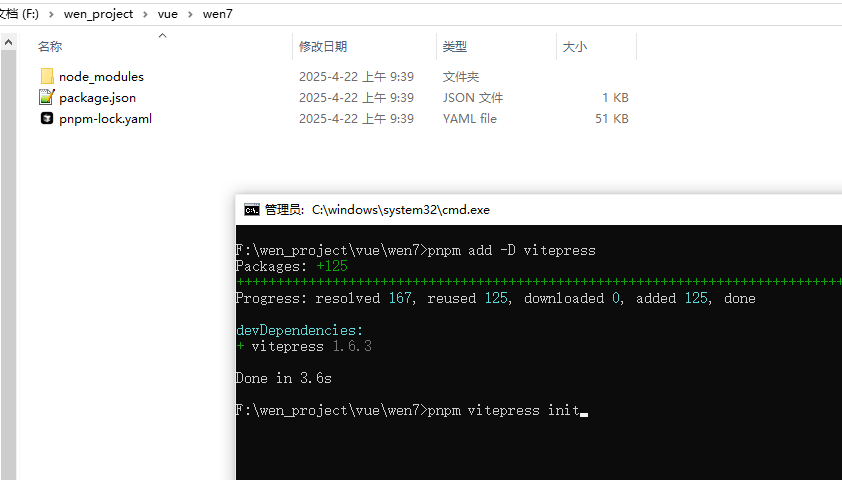
初始化一些配置,并且启动
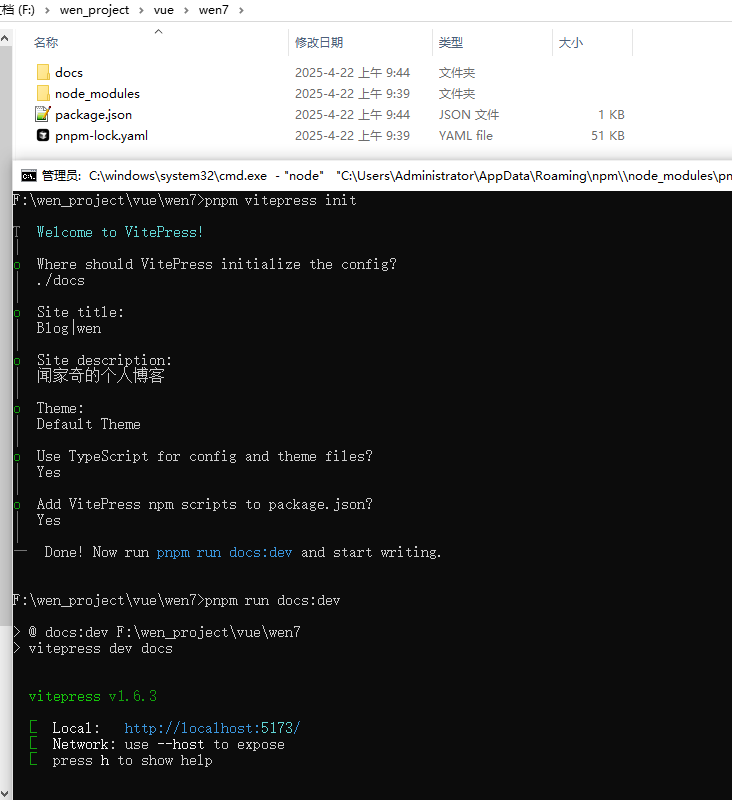
./docs 创建一个 docs 目录,初始化的配置就在这个目录下
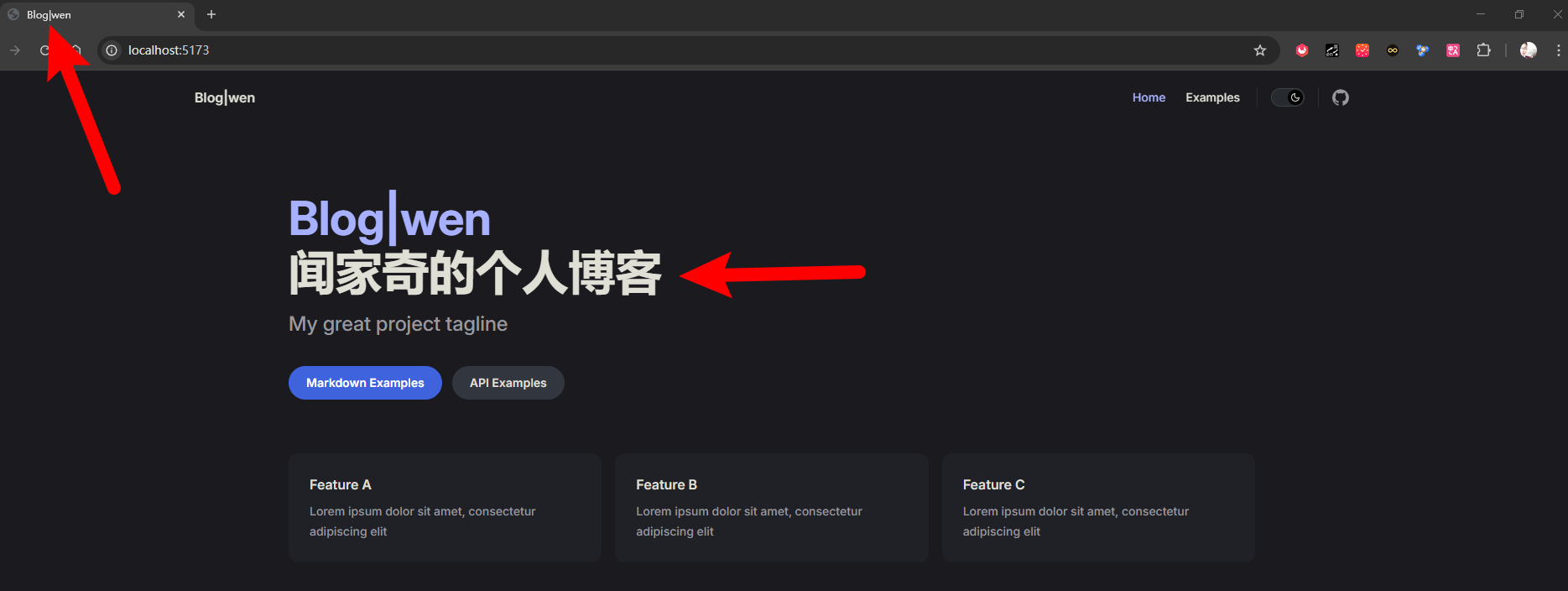
Site title:站点的 title,最后展示在浏览器上的 title
Site description:站点描述,最后展示在首页描述
Theme:选择主题
Use TypeScript:是否使用 TS
  // 运行起来
pnpm run docs:dev//package.json
"scripts": {
"docs:dev": "vitepress dev docs --host 0.0.0.0", //添加 --host 0.0.0.0 可以通过 ip 访问,建议添加,后续移动端
"docs:build": "vitepress build docs",
"docs:preview": "vitepress preview docs"
}.vitepress/config.js
官方文档:https://vitepress.dev/reference/site-config
import {defineConfig} from 'vitepress'
import {generateCarbonAds, generateNav, generateSidebar, generateSocialLinks} from "./utils/generate_theme";

/**
 * @description 参考官方文档  https://vitepress.dev/reference/site-config
 * 站点配置, defineConfig 里的内容
 * 根目录: project root
 * 源目录: source root
 * .
 * ├─ docs                    # 项目根目录
 * │  ├─ .vitepress           # 配置目录
 * │  ├─ getting-started.md
 * │  └─ index.md
 * └─ ...
 * @author wen7.online
 */
export default defineConfig({
    //Site Metadata
    title: "Blog",                //配置站点标题, title 和 titleTemplate 会组合,显示在浏览器标签页上 Blog | 闻
    titleTemplate: '闻',
    description: "闻家奇",         // HTML head 标签里的 meta 数据,搜索引擎 seo 关键词
    head: [['link', {rel: 'icon', href: '/favicon.ico'}]],   // 放在 /docs/public/favicon.ico
    lang: 'zh',                   //配置语言
    base: "/",    			      //


    //Routing
    cleanUrls: true,             //配置清除 url 中的 .html 后缀


    //Build
    /**
     * @description 配置了 srcDir,注意需要把 docs 下的其他文件(比如 index.md)等放在 src 下
     * 因为博主平常开发 vue 和 SpringBoot,通常源码放在 src 下,所以这里也配置了 src 目录,存放日常的博客
     * @author wen7.online
     */
    srcDir: 'src',
    srcExclude: ['**/components/**', '**/utils/**'], //配置 srcDir 下不需要编译的文件夹,一般是组件和工具函数
    cacheDir: './.vitepress/cache',                 //缓存目录
    ignoreDeadLinks: true,                          //忽略死链接,VitePress 不会因为死链而导致构建失败


    //Appearance
    appearance: true,             //配置了 appearance,可以在主题配置中配置 appearance
    lastUpdated: true,            //开启最后更新时间,时间是根据提交到 Github 上时间计算的,需要部署之后才能看到效果


    //Customization
    vite: {},
    vue: {},
    markdown: {                   //配置 markdown
        lineNumbers: true,        //开启行号
        image: {
            lazyLoading: true,    //开启图片懒加载
        },
        breaks: true,            //开启换行符支持
    },


    /**
     * @description https://vitepress.dev/zh/reference/default-theme-config
     * 默认主题配置
     *
     * nav 导航栏,
     * sidebar 侧边栏,
     * socialLinks 社交链接
     * carbonAds 广告
     * 上面的几个配置项,使用了代码进行生成,可以在 utils 目录下查看,本质和在下面写死代码是一样的,
     *
     * @author wen7.online
     */
    themeConfig: {
        i18nRouting: true,      //开启国际化路由,需要添加多语言配置
        logo: '/logo.jpg',      //配置 logo,logo 放在 public 文件夹下,注意,如果配置了 src,public 需要挪到 src 下
        siteTitle: '闻家奇',     //配置 logo 后面的站点标题

        aside: 'left',          //侧边栏展示的位置,默认是 true 右侧,
        outline: {
            label: '目录',       //去掉 Outline 的默认标题 On this page
            level: 'deep'       //大纲的深度,可以是 deep, 2,[2,6],
        },
        socialLinks: generateSocialLinks(),
        footer: {
            message: '',
            copyright: 'Copyright © 闻家奇'
        },
        lastUpdated: {
            text: '最后更新时间',
            formatOptions: {
                timeZone: 'Asia/Shanghai',	//上海时区
                year: 'numeric',
                month: '2-digit',
                day: '2-digit',
                hour: '2-digit',
                minute: '2-digit',
                second: '2-digit',
                hour12: false				// 24小时
            }
        },
        //Algolia
        search: {               //开启搜索
            provider: 'local',
            options: {
                translations: {
                    button: {
                        buttonText: "搜一搜",          //搜索框的 placeholder
                        buttonAriaLabel: "搜索文档",

                    },
                    modal: {                            //搜索结果的弹窗
                        resetButtonTitle: "清除搜索条件",
                        displayDetails: "显示详情",
                        noResultsText: "未找到相关结果,尝试更换关键词",
                        footer: {
                            selectText: "确定",
                            navigateText: "切换",
                            closeText: "关闭",
                        },
                    },
                },
            }
        },

        docFooter: {
            prev: "上一页",
            next: "下一页"
        },
        darkModeSwitchLabel: "深浅模式",         //【移动端】深色模式切换按钮的文本
        returnToTopLabel: "返回顶部",           //【移动端】
        externalLinkIcon: true,               // markdown 外部链接显示图标

        nav: generateNav(),
        sidebar: generateSidebar(),
    }
})- Navbar是站点级目录(顶部导航) Sidebar 是站点级目录(跨页面导航),Outline 是页面级目录(页内导航)
generate_sociallinks
/**
 * @description
 * themeConfig主题配置里 socialLinks 是一个数组,用于配置社交链接图标和链接地址
 * 格式:https://vitepress.dev/zh/reference/default-theme-config#sociallinks
 *
 * icon 可以是内置图标名称,也可以是自定义 svg 图标(可以去阿里图标库复制):
 *  {
 *      icon: 'github',
 *      icon: {
 *          svg: '<svg>.........</svg>'
 *      },
 *      link: 'https://github.com/vuejs/vitepress'
 *  },
 *
 * 如果使用内置图标名称,可选值有以下:
 * type SocialLinkIcon =
 *   | 'discord'
 *   | 'facebook'
 *   | 'github'
 *   | 'instagram'
 *   | 'linkedin'
 *   | 'slack'
 *   | 'twitter'
 *   | 'youtube'
 *   | { svg: string }
 *
 * @author wen7.online
 */
export const generateSocialLinks = () => {
        return [
            {
                icon: {
                    svg: '<svg t="1766694659576" class="icon" viewBox="0 0 1024 1024" version="1.1" xmlns="http://www.w3.org/2000/svg" p-id="10978" width="192" height="192"><path d="M347.729118 353.0242c-16.487119 0-29.776737 13.389539-29.776737 29.776737S331.241998 412.677596 347.729118 412.677596s29.776737-13.389539 29.776737-29.776737-13.289617-29.876659-29.776737-29.876659zM577.749415 511.800156c-13.689305 0-24.880562 11.091335-24.880563 24.880562 0 13.689305 11.091335 24.880562 24.880563 24.880562 13.689305 0 24.880562-11.191257 24.880562-24.880562s-11.191257-24.880562-24.880562-24.880562zM500.909446 412.677596c16.487119 0 29.776737-13.389539 29.776737-29.776737s-13.389539-29.776737-29.776737-29.776737c-16.487119 0-29.776737 13.389539-29.776737 29.776737s13.289617 29.776737 29.776737 29.776737zM698.455113 511.600312c-13.689305 0-24.880562 11.091335-24.880562 24.880562 0 13.689305 11.091335 24.880562 24.880562 24.880562 13.689305 0 24.880562-11.091335 24.880562-24.880562-0.099922-13.689305-11.191257-24.880562-24.880562-24.880562z" fill="#00C800" p-id="10979"></path><path d="M511.601093 0.799375C229.12178 0.799375 0.000781 229.820453 0.000781 512.399688s229.021077 511.600312 511.600312 511.600312 511.600312-229.021077 511.600312-511.600312S794.180328 0.799375 511.601093 0.799375z m-90.229508 634.504294c-27.37861 0-49.361436-5.595628-76.839969-10.991413l-76.640125 38.469945 21.882904-65.948477c-54.957065-38.370023-87.73146-87.831382-87.73146-148.084309 0-104.318501 98.722873-186.554254 219.32865-186.554255 107.815769 0 202.34192 65.648712 221.327088 153.979703-6.994536-0.799375-13.989071-1.298985-21.083529-1.298985-104.118657 0-186.454333 77.739266-186.454332 173.564403 0 15.98751 2.498048 31.275566 6.794692 45.964091-6.794692 0.599532-13.689305 0.899297-20.583919 0.899297z m323.547228 76.839969l16.48712 54.757221-60.153006-32.874317c-21.882904 5.495706-43.965652 10.991413-65.848555 10.991413-104.318501 0-186.554254-71.344262-186.554255-159.175644 0-87.631538 82.135831-159.175644 186.554255-159.175644 98.523029 0 186.254489 71.444184 186.254488 159.175644 0.099922 49.461358-32.774395 93.227166-76.740047 126.301327z" fill="#00C800" p-id="10980"></path></svg>'
                }, link: '/social/social_wechat'
            },
            {
                icon: {
                    svg: '<svg t="1766694239056" class="icon" viewBox="0 0 1024 1024" version="1.1" xmlns="http://www.w3.org/2000/svg" p-id="5863" width="192" height="192"><path d="M512 1024C229.2224 1024 0 794.7776 0 512 0 229.2224 229.2224 0 512 0c282.7776 0 512 229.2224 512 512 0 282.7776-229.2224 512-512 512z m17.066667-413.525333c34.850133 4.352 68.778667 5.12 102.741333 2.0992 23.04-2.048 44.817067-8.362667 64.170667-21.9136 38.212267-26.794667 49.783467-85.1968 24.251733-123.050667-14.626133-21.7088-36.8128-30.344533-60.757333-35.498667-35.054933-7.543467-70.4512-5.751467-105.847467-3.413333-5.666133 0.3584-6.7584 3.072-7.236267 8.209067-3.072 32.682667-6.536533 65.314133-9.813333 97.962666-2.5088 24.814933-4.932267 49.629867-7.509333 75.605334z m53.4016-33.928534c1.962667-20.906667 3.6352-39.338667 5.4272-57.770666 1.553067-15.906133 3.413333-31.778133 4.727466-47.701334 0.3584-4.283733 1.553067-6.656 5.956267-6.382933 15.616 1.041067 31.709867 0.034133 46.728533 3.652267 36.488533 8.823467 48.725333 54.306133 23.3472 83.029333-15.8208 17.902933-36.7616 23.586133-59.255466 25.088-8.465067 0.546133-17.015467 0.085333-26.9312 0.085333zM512 434.295467c-2.184533-0.648533-3.5328-1.1776-4.932267-1.4336-37.717333-6.877867-75.690667-8.328533-113.646933-2.816-20.974933 3.037867-41.0112 9.489067-57.480533 23.330133-22.9888 19.319467-21.640533 46.848 4.4032 62.0032 13.056 7.594667 28.023467 12.509867 42.5984 17.288533 14.08 4.608 28.996267 6.826667 43.144533 11.264 12.5952 3.925333 14.011733 14.318933 3.584 22.306134-3.345067 2.56-7.441067 5.085867-11.537067 5.751466-11.195733 1.826133-22.698667 4.386133-33.826133 3.566934-24.098133-1.774933-48.042667-5.461333-72.5504-8.430934-1.365333 10.615467-2.935467 23.0912-4.5568 35.9424 4.181333 1.365333 7.68 2.730667 11.264 3.618134 33.9456 8.4992 68.386133 9.608533 102.912 5.12 20.087467-2.6112 39.4752-7.901867 56.695467-19.029334 28.603733-18.4832 36.693333-57.1904-4.676267-75.383466-14.506667-6.382933-30.190933-10.410667-45.482667-15.086934-11.4176-3.4816-23.313067-5.614933-34.525866-9.5232-9.7792-3.413333-11.144533-12.202667-3.037867-18.397866 4.6592-3.549867 10.717867-6.997333 16.384-7.3728a480.853333 480.853333 0 0 1 53.384533-0.853334c15.377067 0.699733 30.651733 3.549867 46.4896 5.5296L512 434.295467z m257.143467 2.048L750.933333 614.2976h54.152534c4.778667-45.636267 9.710933-90.7264 14.062933-135.8848 0.6144-6.365867 2.3552-8.840533 8.686933-9.0112 11.434667-0.273067 22.8864-1.979733 34.286934-1.570133 23.722667 0.853333 42.3936 9.728 38.4 43.264-2.901333 24.2688-5.597867 48.571733-8.2432 72.874666-1.092267 10.069333-1.826133 20.189867-2.730667 30.4128h55.330133c3.584-35.259733 7.9872-70.058667 10.496-104.994133 3.413333-47.4624-17.7664-73.3184-64.682666-80.213333-40.96-6.007467-81.339733-0.341333-121.5488 7.133866z m-483.498667 134.6048c-8.738133 1.297067-16.384 2.798933-24.098133 3.4816-25.6512 2.235733-51.319467 3.9424-76.305067-4.266667-13.909333-4.590933-24.6784-12.578133-29.7984-25.9584-7.901867-20.701867 0.887467-47.104 19.831467-60.3136 17.373867-12.117333 37.717333-15.9232 58.453333-15.9232 22.545067-0.017067 45.090133 2.423467 68.232533 3.84L307.2 432.298667c-15.069867-1.723733-29.4912-3.925333-43.997867-4.9152-41.0112-2.798933-80.64 2.6112-117.469866 20.462933-30.020267 14.557867-52.053333 36.010667-58.6752 68.130133-7.850667 38.144 11.537067 69.495467 51.7632 85.845334 19.1488 7.765333 39.287467 12.509867 60.0064 12.5952 24.746667 0.1024 49.493333-1.570133 74.205866-2.952534 3.106133-0.170667 8.311467-2.901333 8.669867-5.034666 1.979733-11.554133 2.730667-23.278933 3.9424-35.464534z" fill="#DD1700" p-id="5864"></path></svg>'
                }, link: 'CSDN地址'
            },
            {
                icon: {
                    svg: '<svg t="1766694451050" class="icon" viewBox="0 0 1024 1024" version="1.1" xmlns="http://www.w3.org/2000/svg" p-id="8715" width="192" height="192"><path d="M512 1021.72444445A509.72444445 509.72444445 0 1 1 512 2.27555555a509.72444445 509.72444445 0 0 1 0 1019.4488889z m257.99338667-566.37667556H480.54272a25.19495111 25.19495111 0 0 0-25.19495111 25.19495111v62.91456c0 13.90819555 11.28675555 25.19495111 25.12213333 25.19495111h176.21902223c13.98101333 0 25.19495111 11.28675555 25.1949511 25.12213334v12.59747555c0 41.72458667-33.78744889 75.51203555-75.51203555 75.51203555H367.23825778a25.19495111 25.19495111 0 0 1-25.12213333-25.12213333V417.62816c0-41.72458667 33.78744889-75.51203555 75.43921777-75.51203555h352.43804445c13.83537778 0 25.12213333-11.28675555 25.12213333-25.19495112v-62.91456a25.19495111 25.19495111 0 0 0-25.12213333-25.19495111h-352.43804445a188.74368 188.74368 0 0 0-188.74368 188.81649778v352.36522667c0 13.90819555 11.28675555 25.19495111 25.19495111 25.19495111h371.22503112a169.88387555 169.88387555 0 0 0 169.95669333-169.88387556V480.54272a25.19495111 25.19495111 0 0 0-25.19495111-25.19495111z" fill="#C71D23" p-id="8716"></path></svg>'
                }, link: 'Gitee地址'
            },
            {
                icon: {
                    svg: '<svg t="1766694348658" class="icon" viewBox="0 0 1049 1024" version="1.1" xmlns="http://www.w3.org/2000/svg" p-id="6845" width="192" height="192"><path d="M524.979332 0C234.676191 0 0 234.676191 0 524.979332c0 232.068678 150.366597 428.501342 358.967656 498.035028 26.075132 5.215026 35.636014-11.299224 35.636014-25.205961 0-12.168395-0.869171-53.888607-0.869171-97.347161-146.020741 31.290159-176.441729-62.580318-176.441729-62.580318-23.467619-60.841976-58.234462-76.487055-58.234463-76.487055-47.804409-32.15933 3.476684-32.15933 3.476685-32.15933 53.019436 3.476684 80.83291 53.888607 80.83291 53.888607 46.935238 79.963739 122.553122 57.365291 152.97411 43.458554 4.345855-33.897672 18.252593-57.365291 33.028501-70.402857-116.468925-12.168395-239.022047-57.365291-239.022047-259.012982 0-57.365291 20.860106-104.300529 53.888607-140.805715-5.215026-13.037566-23.467619-66.926173 5.215027-139.067372 0 0 44.327725-13.906737 144.282399 53.888607 41.720212-11.299224 86.917108-17.383422 131.244833-17.383422s89.524621 6.084198 131.244833 17.383422C756.178839 203.386032 800.506564 217.29277 800.506564 217.29277c28.682646 72.1412 10.430053 126.029806 5.215026 139.067372 33.897672 36.505185 53.888607 83.440424 53.888607 140.805715 0 201.64769-122.553122 245.975415-239.891218 259.012982 19.121764 16.514251 35.636014 47.804409 35.636015 97.347161 0 70.402857-0.869171 126.898978-0.869172 144.282399 0 13.906737 9.560882 30.420988 35.636015 25.205961 208.601059-69.533686 358.967656-265.96635 358.967655-498.035028C1049.958663 234.676191 814.413301 0 524.979332 0z" fill="#191717" p-id="6846"></path><path d="M199.040177 753.571326c-0.869171 2.607513-5.215026 3.476684-8.691711 1.738342s-6.084198-5.215026-4.345855-7.82254c0.869171-2.607513 5.215026-3.476684 8.691711-1.738342s5.215026 5.215026 4.345855 7.82254z m-6.953369-4.345856M219.900283 777.038945c-2.607513 2.607513-7.82254 0.869171-10.430053-2.607514-3.476684-3.476684-4.345855-8.691711-1.738342-11.299224 2.607513-2.607513 6.953369-0.869171 10.430053 2.607514 3.476684 4.345855 4.345855 9.560882 1.738342 11.299224z m-5.215026-5.215027M240.760389 807.459932c-3.476684 2.607513-8.691711 0-11.299224-4.345855-3.476684-4.345855-3.476684-10.430053 0-12.168395 3.476684-2.607513 8.691711 0 11.299224 4.345855 3.476684 4.345855 3.476684 9.560882 0 12.168395z m0 0M269.443034 837.011749c-2.607513 3.476684-8.691711 2.607513-13.906737-1.738342-4.345855-4.345855-6.084198-10.430053-2.607513-13.037566 2.607513-3.476684 8.691711-2.607513 13.906737 1.738342 4.345855 3.476684 5.215026 9.560882 2.607513 13.037566z m0 0M308.555733 853.526c-0.869171 4.345855-6.953369 6.084198-13.037566 4.345855-6.084198-1.738342-9.560882-6.953369-8.691711-10.430053 0.869171-4.345855 6.953369-6.084198 13.037566-4.345855 6.084198 1.738342 9.560882 6.084198 8.691711 10.430053z m0 0M351.145116 857.002684c0 4.345855-5.215026 7.82254-11.299224 7.82254-6.084198 0-11.299224-3.476684-11.299224-7.82254s5.215026-7.82254 11.299224-7.82254c6.084198 0 11.299224 3.476684 11.299224 7.82254z m0 0M391.126986 850.049315c0.869171 4.345855-3.476684 8.691711-9.560882 9.560882-6.084198 0.869171-11.299224-1.738342-12.168395-6.084197-0.869171-4.345855 3.476684-8.691711 9.560881-9.560882 6.084198-0.869171 11.299224 1.738342 12.168396 6.084197z m0 0" fill="#191717" p-id="6847"></path></svg>'
                }, link: 'Github地址'
            },
            {
                icon: {
                    svg: '<svg t="1676025513460" class="icon" viewBox="0 0 1129 1024" version="1.1" xmlns="http://www.w3.org/2000/svg" p-id="2745" width="200" height="200"><path d="M234.909 9.656a80.468 80.468 0 0 1 68.398 0 167.374 167.374 0 0 1 41.843 30.578l160.937 140.82h115.07l160.936-140.82a168.983 168.983 0 0 1 41.843-30.578A80.468 80.468 0 0 1 930.96 76.445a80.468 80.468 0 0 1-17.703 53.914 449.818 449.818 0 0 1-35.406 32.187 232.553 232.553 0 0 1-22.531 18.508h100.585a170.593 170.593 0 0 1 118.289 53.109 171.397 171.397 0 0 1 53.914 118.288v462.693a325.897 325.897 0 0 1-4.024 70.007 178.64 178.64 0 0 1-80.468 112.656 173.007 173.007 0 0 1-92.539 25.75h-738.7a341.186 341.186 0 0 1-72.421-4.024A177.835 177.835 0 0 1 28.91 939.065a172.202 172.202 0 0 1-27.36-92.539V388.662a360.498 360.498 0 0 1 0-66.789A177.03 177.03 0 0 1 162.487 178.64h105.414c-16.899-12.07-31.383-26.555-46.672-39.43a80.468 80.468 0 0 1-25.75-65.984 80.468 80.468 0 0 1 39.43-63.57M216.4 321.873a80.468 80.468 0 0 0-63.57 57.937 108.632 108.632 0 0 0 0 30.578v380.615a80.468 80.468 0 0 0 55.523 80.469 106.218 106.218 0 0 0 34.601 5.632h654.208a80.468 80.468 0 0 0 76.444-47.476 112.656 112.656 0 0 0 8.047-53.109v-354.06a135.187 135.187 0 0 0 0-38.625 80.468 80.468 0 0 0-52.304-54.719 129.554 129.554 0 0 0-49.89-7.242H254.22a268.764 268.764 0 0 0-37.82 0z m0 0" fill="#20B0E3" p-id="2746"></path><path d="M348.369 447.404a80.468 80.468 0 0 1 55.523 18.507 80.468 80.468 0 0 1 28.164 59.547v80.468a80.468 80.468 0 0 1-16.094 51.5 80.468 80.468 0 0 1-131.968-9.656 104.609 104.609 0 0 1-10.46-54.719v-80.468a80.468 80.468 0 0 1 70.007-67.593z m416.02 0a80.468 80.468 0 0 1 86.102 75.64v80.468a94.148 94.148 0 0 1-12.07 53.11 80.468 80.468 0 0 1-132.773 0 95.757 95.757 0 0 1-12.875-57.133V519.02a80.468 80.468 0 0 1 70.007-70.812z m0 0" fill="#20B0E3" p-id="2747"></path></svg>'
                }, link: 'Bilibili地址'
            },
            {
                icon: {
                    svg: '<svg t="1766694858706" class="icon" viewBox="0 0 1024 1024" version="1.1" xmlns="http://www.w3.org/2000/svg" p-id="13902" width="192" height="192"><path d="M0 0m184.32 0l655.36 0q184.32 0 184.32 184.32l0 655.36q0 184.32-184.32 184.32l-655.36 0q-184.32 0-184.32-184.32l0-655.36q0-184.32 184.32-184.32Z" fill="#111111" p-id="13903"></path><path d="M204.27776 670.59712a246.25152 246.25152 0 0 1 245.97504-245.97504v147.57888a98.49856 98.49856 0 0 0-98.38592 98.38592c0 48.34304 26.14272 100.352 83.54816 100.352 3.81952 0 93.55264-0.88064 93.55264-77.19936V134.35904h157.26592a133.31456 133.31456 0 0 0 133.12 132.99712l-0.13312 147.31264a273.152 273.152 0 0 1-142.62272-38.912l-0.06144 317.98272c0 146.00192-124.24192 224.77824-241.14176 224.77824-131.74784 0.03072-231.1168-106.56768-231.1168-247.92064z" fill="#FF4040" p-id="13904"></path><path d="M164.92544 631.23456a246.25152 246.25152 0 0 1 245.97504-245.97504v147.57888a98.49856 98.49856 0 0 0-98.38592 98.38592c0 48.34304 26.14272 100.352 83.54816 100.352 3.81952 0 93.55264-0.88064 93.55264-77.19936V94.99648h157.26592a133.31456 133.31456 0 0 0 133.12 132.99712l-0.13312 147.31264a273.152 273.152 0 0 1-142.62272-38.912l-0.06144 317.98272c0 146.00192-124.24192 224.77824-241.14176 224.77824-131.74784 0.03072-231.1168-106.56768-231.1168-247.92064z" fill="#00F5FF" p-id="13905"></path><path d="M410.91072 427.58144c-158.8224 20.15232-284.44672 222.72-154.112 405.00224 120.40192 98.47808 373.68832 41.20576 380.70272-171.85792l-0.17408-324.1472a280.7296 280.7296 0 0 0 142.88896 38.62528V261.2224a144.98816 144.98816 0 0 1-72.8064-54.82496 135.23968 135.23968 0 0 1-54.70208-72.45824h-123.66848l-0.08192 561.41824c-0.11264 78.46912-130.9696 106.41408-164.18816 30.2592-83.18976-39.77216-64.37888-190.9248 46.31552-192.57344z" fill="#FFFFFF" p-id="13906"></path></svg>'
                }, link: '抖音地址'
            },
        ]
}social/social_wechat.md
# 你的支持,是我持续创作的最大动力❤️


<img src="./social_pay_wechat.jpg" style="zoom:50%;" />

---


# 感谢

| 微信昵称 | 金额 | 留言       | 时间                  |
| -------- | ---- | ---------- | --------------------- |
| Jane | ¥10 | 支持好兄弟 | 2025年4月9日 17:54:02 |generate_nav.ts
/**
 * @description 生成导航栏 文档地址 https://vitepress.dev/zh/reference/default-theme-config#nav
 * 根据项目需求,
 * - 如果导航栏比较少,可以直接写死(导航的分类一般比较固定)
 * - 如果需要动态生成,可以使用函数生成
 *
 * text 是导航显示的文字
 * link 是链接
 * items 是下拉菜单,可以嵌套
 * @author wen7.online
 */
export const generateNav = (): DefaultTheme.NavItem[] => {
    return [
        {text: '首页', link: '/'},
        {
            // text: '前端', items: [
            //     {text: 'HTML', link: '/前端/HTML/'},
            //     {text: 'CSS', link: '/前端/CSS/'},
            //     {text: 'JavaScript', link: '/前端/JavaScript/'},
            // ],

            text: '前端', items: [
                {
                    items: [
                        {text: 'HTML', link: '/前端/HTML/'},
                        {text: 'CSS', link: '/前端/CSS/'},
                        {text: 'JavaScript', link: '/前端/JavaScript/'},
                    ]
                },
                {
                    items: [
                        {text: '微信小程序', link: '/前端/微信小程序/'},
                        {text: 'Vue3', link: '/前端/Vue3/'}
                    ]
                },
                {
                    items: [
                        {text: 'Uniapp', link: '/前端/Uniapp/'},
                        {text: 'Flutter', link: '/前端/Flutter/'},
                    ]
                }
            ],
        },
    ]
}首页
修改 src/index.md,即可修改首页的样式,官方链接:https://vitepress.dev/zh/reference/default-theme-home-page
---
# https://vitepress.dev/reference/default-theme-home-page
layout: home

#修改浏览器标签页上的标题
#title: Blog

hero:
  name: "wen7.online"
  text: "闻家奇的博客"
  tagline: Talk is cheap. Show me the code.
  # 展示在首页顶部的图片
  image: /logo.png
  actions:
    - theme: brand
      text: 开源项目 quick
      link: https://quick.wen7.online
      target: _blank
    - theme: alt
      text: API Examples
      link: /api-examples

features:
  - title: 前端
    icon:
      src: /logo.png
    details: "
            Vue2、Vue3、ElementPlus、AntDesign
            <br>
            Flutter、微信小程序
            <br>
            ThreeJS、Echarts
            "
  - title: 后端
    icon:
      src: /logo.png
    details: "
            Java、SpringBoot、SpringCloud
            <br>
            Python、Pandas、Numpy、Matplotlib
            <br>
            Golang、Gom、Gorm
            "
  - title: 数据库
    icon:
      src: /logo.png
    details: "
            MySQL、PostgreSQL
            <br>
            Redis、MongoDB
            <br>
            Elasticsearch、Neo4j、Milvus、ClickHouse
            "
  - title: 运维
    icon:
      src: /logo.png
    details: "
            Linux、Docker、Kubernetes
            "
  - title: AI
    icon:
      src: /logo.png
    details: "
            MCP、PyTorch
            "
  - title: GIS
    icon:
      src: /logo.png
    details: "PostGIS、GeoServer"
---自定义主题
https://vitepress.dev/zh/guide/custom-theme
.vitepress/theme/index.ts
新建 .vitepress/theme/index.ts
import DefaultTheme from 'vitepress/theme'
import Layout from './Layout.vue'
// import './wen.css'

export default {
    ...DefaultTheme,
    Layout,
}.vitepress/theme/Layout.vue
新建 .vitepress/theme/Layout.vue
<template>
  <!-- 外层自己包一层,注入自定义头部、侧边、底部等 -->
  <div class="my-app">

    <!-- 使用默认 Layout,保留默认功能(侧边栏、返回顶部等) -->
    <Layout>
      <!-- ========== 页面整体 ========== -->

      <!--<template #layout-top>-->
      <!--  <div class="test-style">-->
      <!--    🔥 layout-top 插槽:整个站点最顶部(导航栏之上),一般放公告、全站提示-->
      <!--  </div>-->
      <!--</template>-->

      <!--<template #layout-bottom>-->
      <!--  <div class="test-style">-->
      <!--    🔥 layout-bottom 插槽:整个页面最底部(Footer 之后),统计脚本 / 备案信息-->
      <!--  </div>-->
      <!--</template>-->

      <!-- ========== 导航栏 NavBar ========== -->

      <!--<template #nav-bar-title-before>-->
      <!--  <div class="test-style">-->
      <!--    🔥 nav-bar-title-before:站点标题 / Logo 左侧-->
      <!--  </div>-->
      <!--</template>-->

      <!--<template #nav-bar-title-after>-->
      <!--  <div class="test-style">-->
      <!--    🔥 nav-bar-title-after:站点标题 / Logo 右侧(版本号、环境标识)-->
      <!--  </div>-->
      <!--</template>-->

      <!--<template #nav-bar-content-before>-->
      <!--  <div class="test-style">-->
      <!--    🔥 nav-bar-content-before:导航栏内容最左侧-->
      <!--  </div>-->
      <!--</template>-->

      <!--<template #nav-bar-content-after>-->
      <!--  <div class="test-style">-->
      <!--    🔥 nav-bar-content-after:导航栏内容最右侧(登录按钮、用户头像)-->
      <!--  </div>-->
      <!--</template>-->

      <!-- ========== 侧边栏 Sidebar ========== -->

      <!--<template #sidebar-nav-before>-->
      <!--  <div class="test-style">-->
      <!--    🔥 sidebar-nav-before:侧边栏最顶部(作者信息、项目介绍)-->
      <!--  </div>-->
      <!--</template>-->

      <!--<template #sidebar-nav-after>-->
      <!--  <div class="test-style">-->
      <!--    🔥 sidebar-nav-after:侧边栏最底部(版权、外链)-->
      <!--  </div>-->
      <!--</template>-->

      <!-- ========== 文档内容区域 ========== -->

      <!--<template #page-top>-->
      <!--  <div class="test-style">-->
      <!--    🔥 page-top:文档正文最上方(文档级提示、警告)-->
      <!--  </div>-->
      <!--</template>-->

      <!--<template #doc-before>-->
      <!--  <div class="test-style">-->
      <!--    🔥 doc-before:Markdown 内容之前(作者、标签、元信息)-->
      <!--  </div>-->
      <!--</template>-->

      <!--<template #doc-after>-->
      <!--  <div class="test-style">-->
      <!--    🔥 doc-after:Markdown 内容之后(评论区、赞赏、相关阅读)-->
      <!--  </div>-->
      <!--</template>-->

      <!--<template #page-bottom>-->
      <!--  <div class="test-style">-->
      <!--    🔥 page-bottom:文档正文最下方(版权声明、反馈入口)-->
      <!--  </div>-->
      <!--</template>-->

      <!-- ========== 大纲 Outline ========== -->

      <!--<template #aside-top>-->
      <!--  <div class="test-style">-->
      <!--    🔥 aside-top:大纲顶部-->
      <!--  </div>-->
      <!--</template>-->

      <!--<template #aside-bottom>-->
      <!--  <div class="test-style">-->
      <!--    🔥 aside-bottom:大纲底部(返回顶部、反馈)-->
      <!--  </div>-->
      <!--</template>-->

      <!-- ========== 首页 Home 专用 ========== -->

      <!--<template #home-hero-before>-->
      <!--  <div class="test-style">-->
      <!--    🔥 home-hero-before:首页 Hero 区域之前-->
      <!--  </div>-->
      <!--</template>-->

      <!--<template #home-hero-after>-->
      <!--  <div class="test-style">-->
      <!--    🔥 home-hero-after:首页 Hero 区域之后-->
      <!--  </div>-->
      <!--</template>-->

      <!--<template #home-features-before>-->
      <!--  <div class="test-style">-->
      <!--    🔥 home-features-before:首页 Features 区域之前-->
      <!--  </div>-->
      <!--</template>-->

      <!--<template #home-features-after>-->
      <!--  <div class="test-style">-->
      <!--    🔥 home-features-after:首页 Features 区域之后-->
      <!--  </div>-->
      <!--</template>-->

      <!-- ========== 404 页面 ========== -->

      <!--<template #not-found>-->
      <!--  <div class="test-style">-->
      <!--    🔥 not-found:自定义 404 页面(可引入 404 组件)-->
      <!--  </div>-->
      <!--</template>-->

    </Layout>

  </div>
</template>

<script setup lang="ts">
  import DefaultTheme from 'vitepress/theme'

  const Layout = DefaultTheme.Layout
</script>

<style>
  .test-style {
    background-color: #97e5ea;
    width: 100%;
    color: red;
    font-size: 30px;
    line-height: 30px;
    text-align: center
  }
</style>sidebar 不生效,通常是 config.mts 里的 themeConfig.sidebar 没有配置,不配置 sidebar 就不会有导航栏,sidebar-nav-before/after 就不显示
page 不生效,每个md 文件默认是渲染成 layout:doc,除非在 markdown 顶部添加
layout:page,则展示 page-top/bottm 插槽
    ---
    layout: page
---常见的三种布局
所有文档在同一个文件里
- 通常用于一整套课程文档,比如本文档 vitepress,目录结构是通过文档内的标题等级,使用的是 Outline 方式
单独文件,通过 index 目录索引
点击 nav 导航,然后通过目录下的 index 目录索引,通常用于单个知识点,比如 SpringBoot 系列,然后整合其他
缺点
- 没有上一页、下一页
- markdown
# Vitepress 教程

- [前置知识](./前置知识.md)
- [快速入门](./快速入门.md)
- [自定义主题](./自定义主题.md)
通过 sidebar 侧边索引
需要把顺序维护在 generateSidebar 里,也可以层级嵌套,
collapsed: true用在分组数据上可以进行折叠- typescript
import {DefaultTheme} from "vitepress";

export const generateSidebar = (): DefaultTheme.Sidebar => {
    return {
        '/其他/vitepress': [
            {
                text: 'vitepress',
                collapsed: true,			//是否折叠
                items: [
                    {text: '前置知识', link: '/其他/vitepress/前置知识'},
                    {text: '快速入门', link: '/其他/vitepress/快速入门'},
                    {text: '自定义主题', link: '/其他/vitepress/自定义主题'},
                ]
            }
        ],
    }
}
我的习惯(闻家奇)
布局
- 在
docs/.vitepress/theme下新建wen.css,并且在index.ts里引入
import './wen.css' /* ===== 仅桌面端生效 ===== */
@media (min-width: 960px) {
/* 调整导航栏的样式 */
.VPNav {
background-color: #FFFFFF;
}
/* 调整 Sidebar 的样式 */
.VPSidebar {
padding-left: 20px !important;
width: var(--vp-sidebar-width) !important;
}
.VPContent,
.VPDoc,
.VPDoc .container {
max-width: none !important;
width: 100% !important;
}
/* 调整 Outline 靠左 */
.VPContent.has-sidebar {
padding-left: var(--vp-sidebar-width) !important;
}
/* 文档内容不再限制最大宽度(占据剩余空间) */
.VPDoc .content-container {
max-width: none !important;
}
} /* ===== 情况:没有 Sidebar ===== */
.VPContent:not(.has-sidebar) {
padding-left: 0 !important;
}
/* Outline 固定到最左 */
.VPContent:not(.has-sidebar) .VPDocAside,
.VPContent:not(.has-sidebar) .VPAside {
padding-left: 20px;
position: fixed;
left: 0;
top: var(--vp-nav-height);
width: 360px; /* Outline 宽度 */
height: calc(100vh - var(--vp-nav-height));
overflow-y: auto;
background: var(--vp-c-bg);
border-right: 1px solid var(--vp-c-divider);
display: block !important;
}
/* 文档区域让出 Outline 空间 */
.VPContent:not(.has-sidebar) .VPDoc .container{
margin-left: 360px; /* 与 Outline 宽度一致 */
max-width: none !important;
width: auto !important;
}
.VPContent:not(.has-sidebar) .VPDoc .container .aside{
max-width: 0 !important;
width: 0 !important;
}
.VPContent:not(.has-sidebar) .VPDoc .content {
padding-left: 0 !important;
max-width: none !important;
width: auto !important;
}文档标题样式
- 在上面
wen.css后面继续添加,可以调整文档的标题编号
	 /* ===== 自定义样式 ===== */
      /* 全局:从 h2 开始计数,因为本人习惯文档正标题是 h1 */
      .VPDoc {
          counter-reset: h2;
      }

      /* h2:一、二、三 */
      .VPDoc h2 {
          counter-reset: h3; /* 每个新 h2,h3 重新从 1 开始 */
      }

      .VPDoc h2::before {
          counter-increment: h2;
          content: counter(h2, cjk-ideographic) " ";
          margin: 0 6px;
          color: var(--vp-c-text-2);
      }


      /* h3:2.1 / 2.2 / 2.3 */
      .VPDoc h3 {
          counter-reset: h4; /* 每个新 h3,h4 重新从 1 开始 */
      }

      .VPDoc h3::before {
          counter-increment: h3;
          content: counter(h2) "." counter(h3) " ";
          margin: 0 6px;
          color: var(--vp-c-text-2);
      }

      /* h4:2.1.1 / 2.1.2 ... */
      .VPDoc h4 {
          counter-reset: h5;
      }

      .VPDoc h4::before {
          counter-increment: h4;
          content: counter(h2) "." counter(h3) "." counter(h4) " ";
          margin: 0 6px;
          color: var(--vp-c-text-2);
      }

      /* 可选:h5/h6 继续递推 */
      .VPDoc h5 {
          counter-reset: h6;
      }

      .VPDoc h5::before {
          counter-increment: h5;
          content: counter(h2) "." counter(h3) "." counter(h4) "." counter(h5) " ";
          margin: 0 6px;
      }

      .VPDoc h6::before {
          counter-increment: h6;
          content: counter(h2) "." counter(h3) "." counter(h4) "." counter(h5) "." counter(h6) " ";
          margin: 0 6px;
}Outline 标题样式
- css
    /* ===== Outline 编号:一 / 二 / 2.1 / 2.1.1 ... ===== */
    .VPDocAsideOutline .content{
        counter-reset: h2;
    }

    /* 一级(对应 h2):ul.root > li */
    .VPDocAsideOutline .VPDocOutlineItem.root > li{
        counter-increment: h2;
        counter-reset: h3;
    }
    .VPDocAsideOutline .VPDocOutlineItem.root > li > a.outline-link::before{
        content: counter(h2, cjk-ideographic) "、";
        font-weight: 600;
    }
    /* Outline 中 h2(一级目录)加粗 */
    .VPDocAsideOutline .VPDocOutlineItem.root > li > a.outline-link {
        font-weight: 600;
    }

    /* 二级(对应 h3):li > ul.nested > li */
    .VPDocAsideOutline .VPDocOutlineItem.root > li > ul.nested > li{
        counter-increment: h3;
        counter-reset: h4;
    }
    .VPDocAsideOutline .VPDocOutlineItem.root > li > ul.nested > li > a.outline-link::before{
        content: counter(h2) "." counter(h3) " ";
    }

    /* 三级(对应 h4):再嵌套一层 */
    .VPDocAsideOutline .VPDocOutlineItem.root > li > ul.nested > li > ul.nested > li{
        counter-increment: h4;
    }
    .VPDocAsideOutline .VPDocOutlineItem.root > li > ul.nested > li > ul.nested > li > a.outline-link::before{
        content: counter(h2) "." counter(h3) "." counter(h4) " ";
    }
Sidebar 分模块
如果博客里内容很多,要很多 sidebar 的时候,可以全部写在 generate_sidebar.ts 文件里。但是也可以分成 n 个 文件
新建,/docs/.vitepress/utils/sidebar/,新建 generate_a.ts、gemerate_b.ts,在 generate_sidebar.ts 里汇总入口
export const generateSidebar = (): DefaultTheme.Sidebar => {
    return {
        ...generateA(),
        ...generateB(),
    }
}样式问题
checkbox 不渲染
npm i markdown-it-task-lists -D// .vitepress/config.ts
import { defineConfig } from "vitepress";
import taskLists from "markdown-it-task-lists";
export default defineConfig({
markdown: {
config(md) {
md.use(taskLists, { enabled: true }); // enabled=true 才会渲染成 checkbox
},
},
});高亮不渲染 == ==
npm i markdown-it-mark -D// .vitepress/config.ts
import { defineConfig } from 'vitepress'
import mark from 'markdown-it-mark'
export default defineConfig({
markdown: {
config(md) {
md.use(mark) //高亮
}
}
})- 在自定义
wen.css文件里添加自己想要的样式
strong{
    background-color: black;
    color: white;
    padding: 0 4px;
    border-radius: 4px;
}

mark {
    padding: 0 6px;
    font-size: 18px;
    color: #e41919;
    font-weight: bold;
    background-color: bisque;
    border-radius: 4px;
}样式错乱
博主本人使用的 Typora 喜欢把代码块放到列表里面,导致 vitepress 发布上去样式错乱,把代码块不要放到有序列表或者无序列表里,和正文一个等级即可。
- ```css

```发布
准备工作
先执行
npm install生成package-lock.json创建 .gitignore 去掉不要提交的
/.idea/
/docs/.vitepress/cache/
/node_modules/- 根据官网提示,在根目录下新建
.github/workflows/deploy.yml文件,注意: 把文件里的分支切换成 master
    # 构建 VitePress 站点并将其部署到 GitHub Pages 的示例工作流程
    #
    name: Deploy VitePress site to Pages

    on:
      # 在针对 `main` 分支的推送上运行。如果你
      # 使用 `master` 分支作为默认分支,请将其更改为 `master`
      push:
        branches: [master]

      # 允许你从 Actions 选项卡手动运行此工作流程
      workflow_dispatch:

    # 设置 GITHUB_TOKEN 的权限,以允许部署到 GitHub Pages
    permissions:
      contents: read
      pages: write
      id-token: write

    # 只允许同时进行一次部署,跳过正在运行和最新队列之间的运行队列
    # 但是,不要取消正在进行的运行,因为我们希望允许这些生产部署完成
    concurrency:
      group: pages
      cancel-in-progress: false

    jobs:
      # 构建工作
      build:
        runs-on: ubuntu-latest
        steps:
          - name: Checkout
            uses: actions/checkout@v4
            with:
              fetch-depth: 0 # 如果未启用 lastUpdated,则不需要
          # - uses: pnpm/action-setup@v3 # 如果使用 pnpm,请取消注释
          # - uses: oven-sh/setup-bun@v1 # 如果使用 Bun,请取消注释
          - name: Setup Node
            uses: actions/setup-node@v4
            with:
              node-version: 20
              cache: npm # 或 pnpm / yarn
          - name: Setup Pages
            uses: actions/configure-pages@v4
          - name: Install dependencies
            run: npm ci # 或 pnpm install / yarn install / bun install
          - name: Build with VitePress
            run: npm run docs:build # 或 pnpm docs:build / yarn docs:build / bun run docs:build
          - name: Upload artifact
            uses: actions/upload-pages-artifact@v3
            with:
              path: docs/.vitepress/dist

      # 部署工作
      deploy:
        environment:
          name: github-pages
		  url: ${{ steps.deployment.outputs.page_url }}
        needs: build
        runs-on: ubuntu-latest
        name: Deploy
        steps:
          - name: Deploy to GitHub Pages
            id: deployment
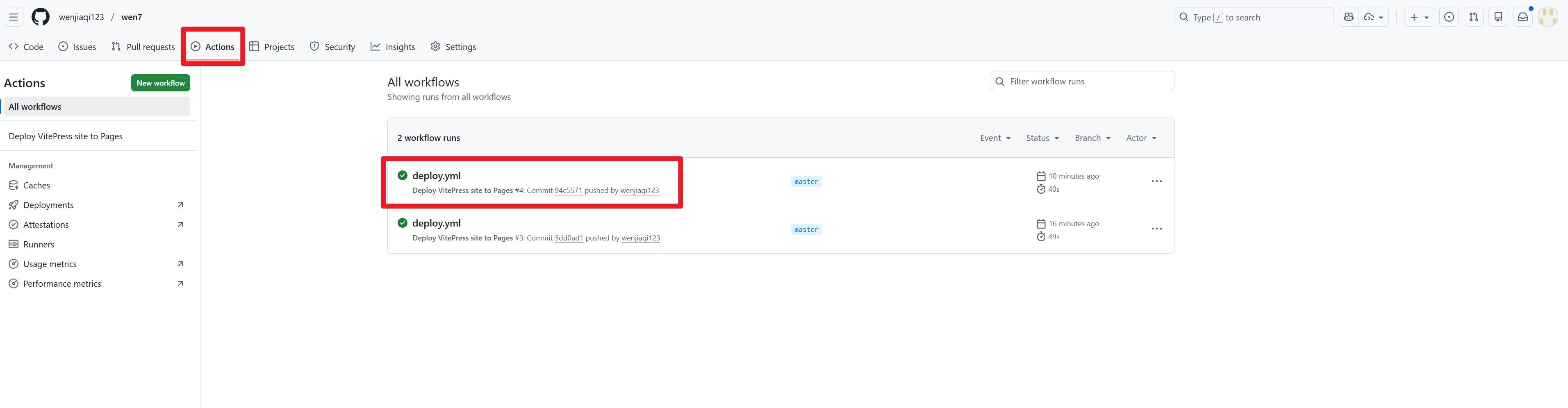
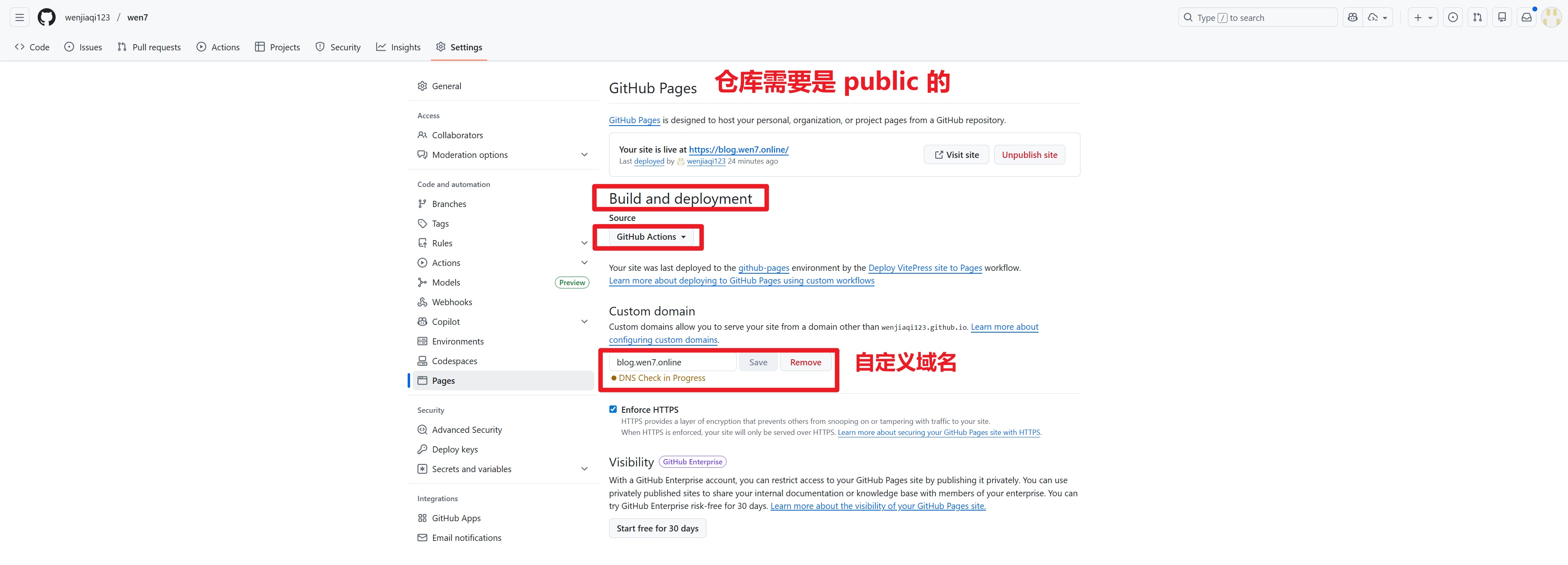
uses: actions/deploy-pages@v4推送到 github,注意:要是 public 的
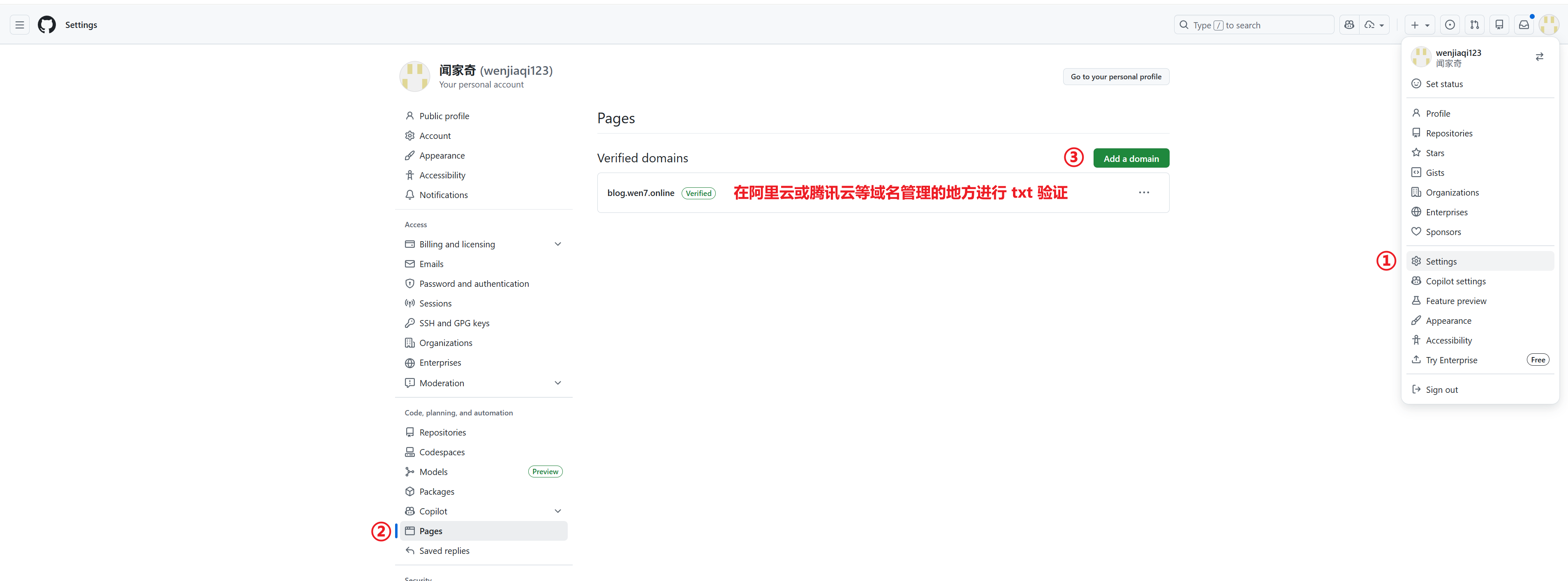
自定义域名
注册自定义组件
假设在 docs/.vitepress/theme 目录下新建了 Umami.vue 文件,
在 docs/.vitepress/theme/index.ts 里注册
import Umami from './Umami.vue'    //引入 Umami 组件


export default {
    ...DefaultTheme,
    Layout,

    enhanceApp(ctx: EnhanceAppContext) {
        ctx.app.component('Umami', Umami)   	//注册 Umami 组件
    }
}后续可以在 index.md 首页里直接使用··
<Umami></Umami>常见问题
- 使用 webstorm 自带的右上角执行 npm,有代码块的 markdown 渲染不出来,
- 使用命令行启动
pnpm run docs:dev
- 使用命令行启动
插件(自定义)
//package.json
{
  "devDependencies": {
    "@giscus/vue": "^3.0.0",
    "vitepress": "^1.5.0"
  },
  "type": "module",		//添加 type ,通知 nodejs 通过 ECMAScript Modules 方式访问
  "scripts": {
    "docs:dev": "vitepress dev docs --host 0.0.0.0",
    "docs:build": "vitepress build docs",
    "docs:preview": "vitepress preview docs"
  }
}博客统计(百度统计)
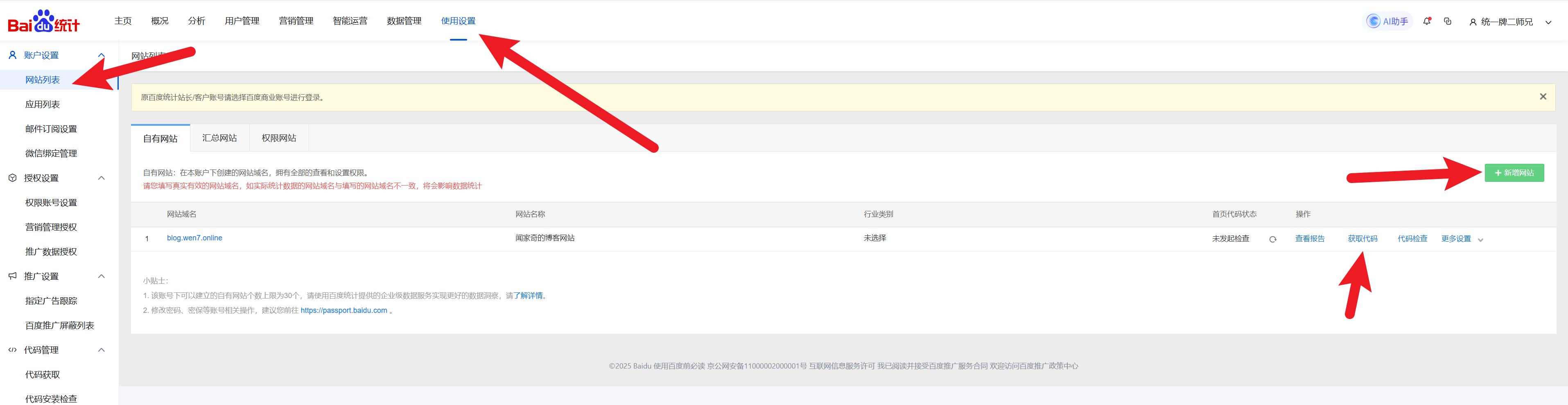
在 config.ts里 defineConfig 里添加 head,把下面一块代码替换成上图中复制到的代码
    head: [
        ['link', {rel: 'icon', href: '/favicon.ico'}],
        ['script',
            {},
            `
        var _hmt = _hmt || [];
        (function() {
        var hm = document.createElement("script");
        hm.src = "https://hm.baidu.com/hm.js?xxxxxxxxxxxxxxxxxxxxxxxxxxxxxx";
        var s = document.getElementsByTagName("script")[0];
        s.parentNode.insertBefore(hm, s);
        })();
        `.trim()]
],访客量(Umami)
注册登录:https://umami.is/
先添加网站
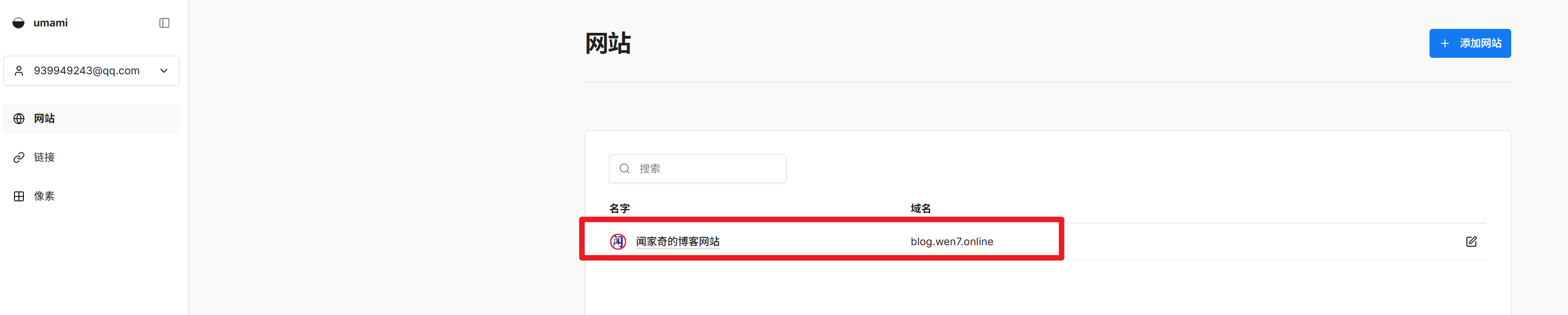
根据上图点击后面那个编辑按钮
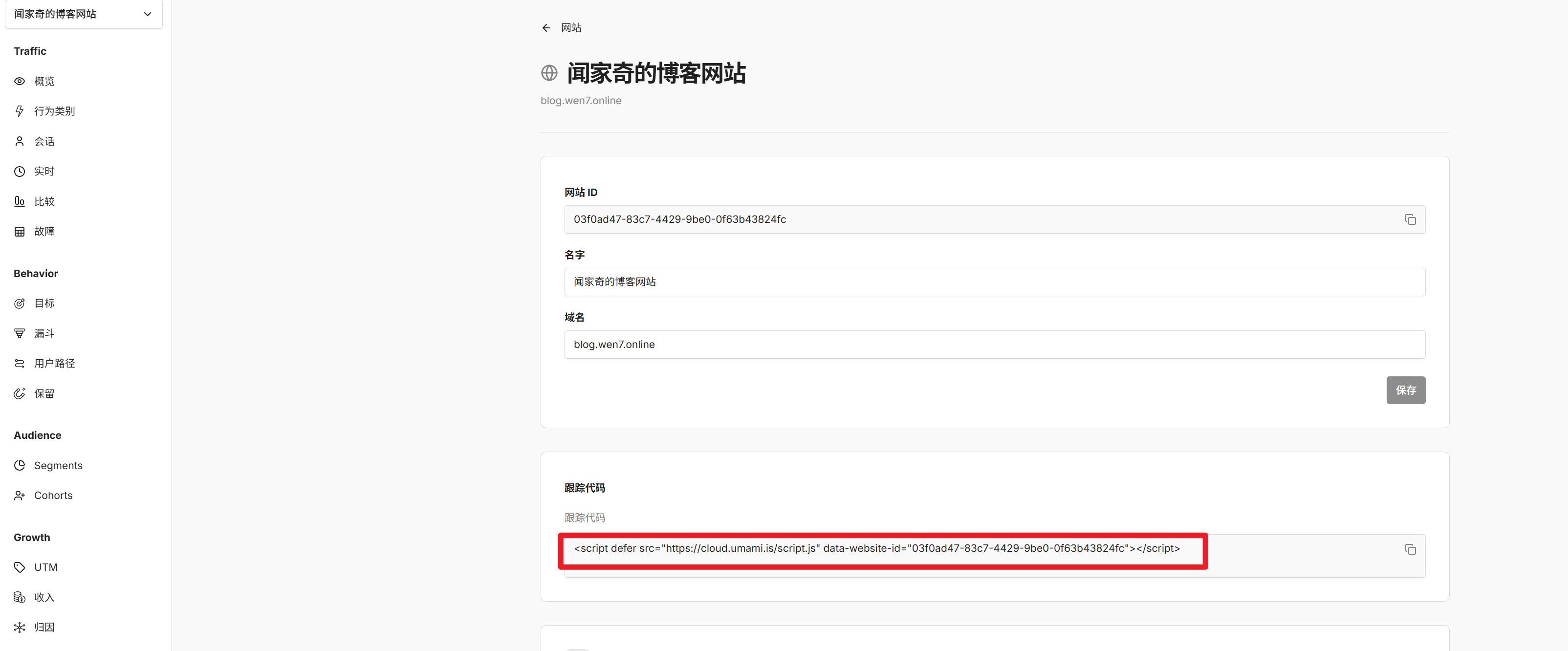
添加 head
在 config.ts里 defineConfig 里添加 head,把下面一块代码替换成上图中复制到的对应代码
head: [
    ['link', {rel: 'icon', href: '/favicon.ico'}],
    [
        'script',
        {
            defer: '',
            src: 'https://cloud.umami.is/script.js',
            'data-website-id': '03f0ad47-83c7-4429-9be0-0f63b43824fc'
        }
    ]
],调整 index.ts
- 主要调整的内容就是注释的地方
import DefaultTheme from 'vitepress/theme'
// @ts-ignore
import Layout from './Layout.vue'
import './wen.css'

import {inBrowser} from 'vitepress'                         //检测是否在浏览器环境中
import type {Theme, EnhanceAppContext} from 'vitepress'     //引入 Theme 类型

export default {
    ...DefaultTheme,
    Layout,

    enhanceApp(ctx: EnhanceAppContext) {            //增强应用程序
        DefaultTheme.enhanceApp?.(ctx)

        if (!inBrowser) return

        const {router} = ctx

        router.onAfterRouteChanged = () => {
            const w: any = window
            if (w.umami?.track) {
                w.umami.track()
            }
        }
    }
} satisfies Theme // 确保类型匹配自检
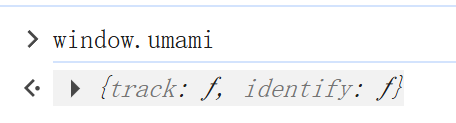
在博客 F12 打开控制台,输入 window.umami 有对象则上报成功。
评论(giscus)
giscus官方文档 ,在官网文档链接里,找到下图这个地方,
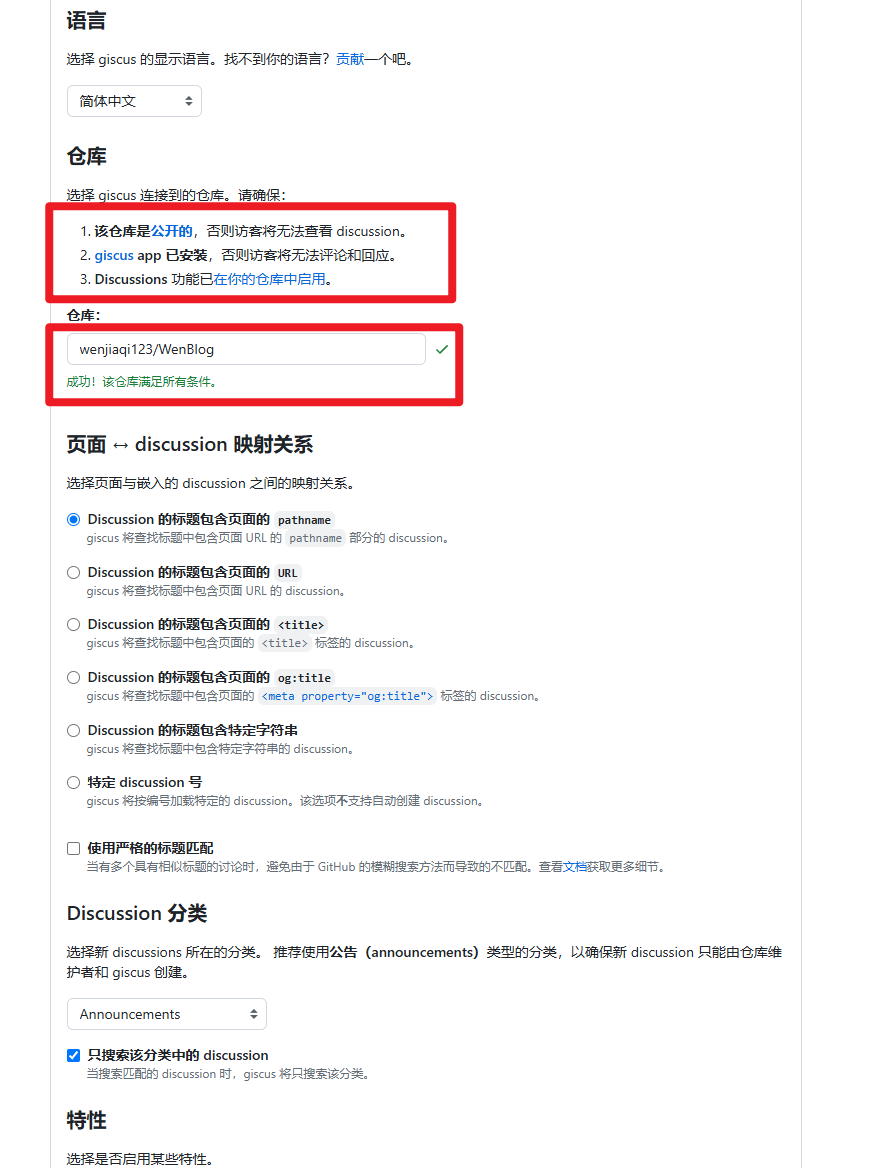
- 确保博客的仓库是 公开的,
- 安装 giscus:https://github.com/docs-site/giscus-discussions,注意选择 repositories。
- 在项目的
Settings里General往下拉,,勾选Discussions - 填写仓库名称,格式为:Github账号名称/博客仓库名称。例如:wenjiaqi123/wen7
- 根据 giscus 生成的配置文件编写 vue 文件
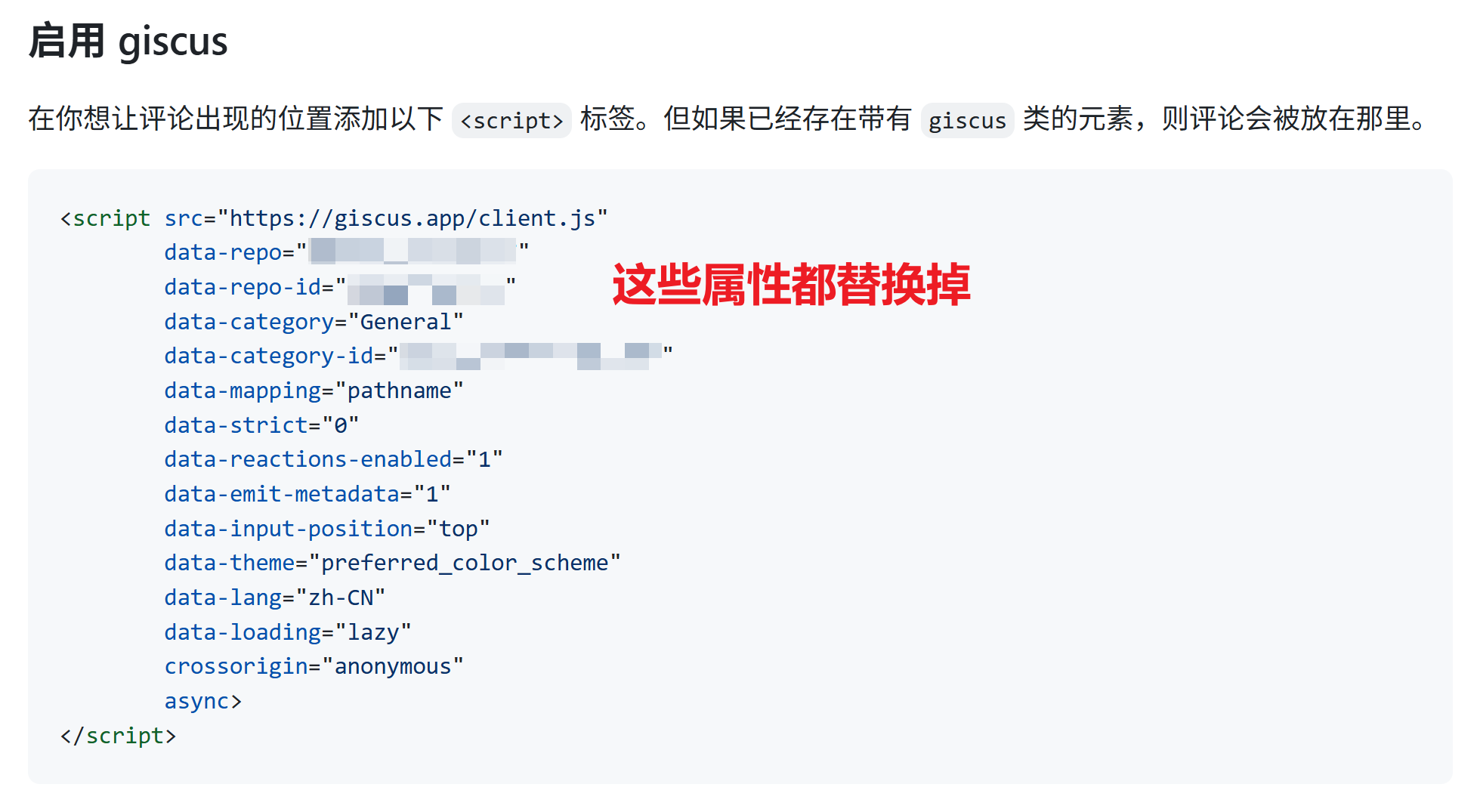
<template>
  <div class="giscus-wrapper">
    <div ref="container"></div>
  </div>
</template>

<script setup lang="ts">
import { onMounted, ref, watch } from 'vue'
import { useRoute, inBrowser } from 'vitepress'

const container = ref<HTMLDivElement | null>(null)
const route = useRoute()

function renderGiscus() {
  if (!inBrowser || !container.value) return

  // 清空,防止 SPA 切换重复挂载
  container.value.innerHTML = ''

  const script = document.createElement('script')
  script.src = 'https://giscus.app/client.js'
  script.async = true
  script.crossOrigin = 'anonymous'

  /* ===== 你的 giscus 配置(原样使用) ===== */
  script.setAttribute('data-repo', 'wenjiaqi123/wen7')
  script.setAttribute('data-repo-id', 'R_kgDOQwzcEA')
  script.setAttribute('data-category', 'General')
  script.setAttribute('data-category-id', 'DIC_kwDOQwzcEM4C0X1S')
  script.setAttribute('data-mapping', 'pathname')
  script.setAttribute('data-strict', '0')
  script.setAttribute('data-reactions-enabled', '1')
  script.setAttribute('data-emit-metadata', '1')
  script.setAttribute('data-input-position', 'top')
  script.setAttribute('data-theme', 'preferred_color_scheme')
  script.setAttribute('data-lang', 'zh-CN')
  script.setAttribute('data-loading', 'lazy')
  /* ======================================= */

  container.value.appendChild(script)
}

onMounted(renderGiscus)

/**
 * ⚠️ 必须监听路由变化
 * VitePress 是 SPA,不监听会导致评论不刷新
 */
watch(
    () => route.path,
    () => renderGiscus()
)
</script>

<style scoped>
.giscus-wrapper {
  margin-top: 48px;
}
</style>- 在
docs/.vitepress/theme/index.ts里注册该组件
import Giscus from './Giscus.vue' //引入 ctx.app.component('Giscus', Giscus) //注册 Giscus 组件- 在 Layout.vue 的插槽里使用该组件
      <template #doc-after>
          <Giscus></Giscus>
      </template>