
quick_flutter
快速模板
| 依赖包 | 主要作用 |
|---|---|
| go_router | 路由导航 |
| flutter_riverpod | 状态存储 |
| tdesign_flutter | TDesign UI |
| dio | 网络请求 |
| flutter_launcher_icons | 统一修改 icon |
| sqflite | sqlite |
| sqflite_common_ffi | sqflite_common_ffi |
| flutter_tts | 文字转语音 |
| permission_handler | 权限 |
| camera | 相机 |
| image_picker | 相册/相机获取图片/视频 |
| photo_manager | 保存到相册 |
| geolocator | 获取定位、经纬度、速度 |
| fl_chart | 图表 |
| vide_player、vide_player_win | 视频播放 |
| path_provider | 文件路径 |
flutter pub add go_router
flutter pub add flutter_riverpod
flutter pub add tdesign_flutter
flutter pub add dio
flutter pub add flutter_launcher_icons

flutter pub add sqflite
flutter pub add sqflite_common_ffi
flutter pub add flutter_tts
flutter pub add permission_handler
flutter pub add camera
flutter pub add image_picker
flutter pub add photo_manager
flutter pub add geolocator
flutter pub add fl_chart
flutter pub add vide_player
flutter pub add video_player_win
flutter pub add path_provider开始
开发工具
- Android Studio https://developer.android.com/studio?hl=zh-cn
- IntelliJ IDEA,安装插件
- Android
- AndroidSupportFramework
- ADB Device Manager,Tools > Android > Device Manager
- Dart
- Flutter
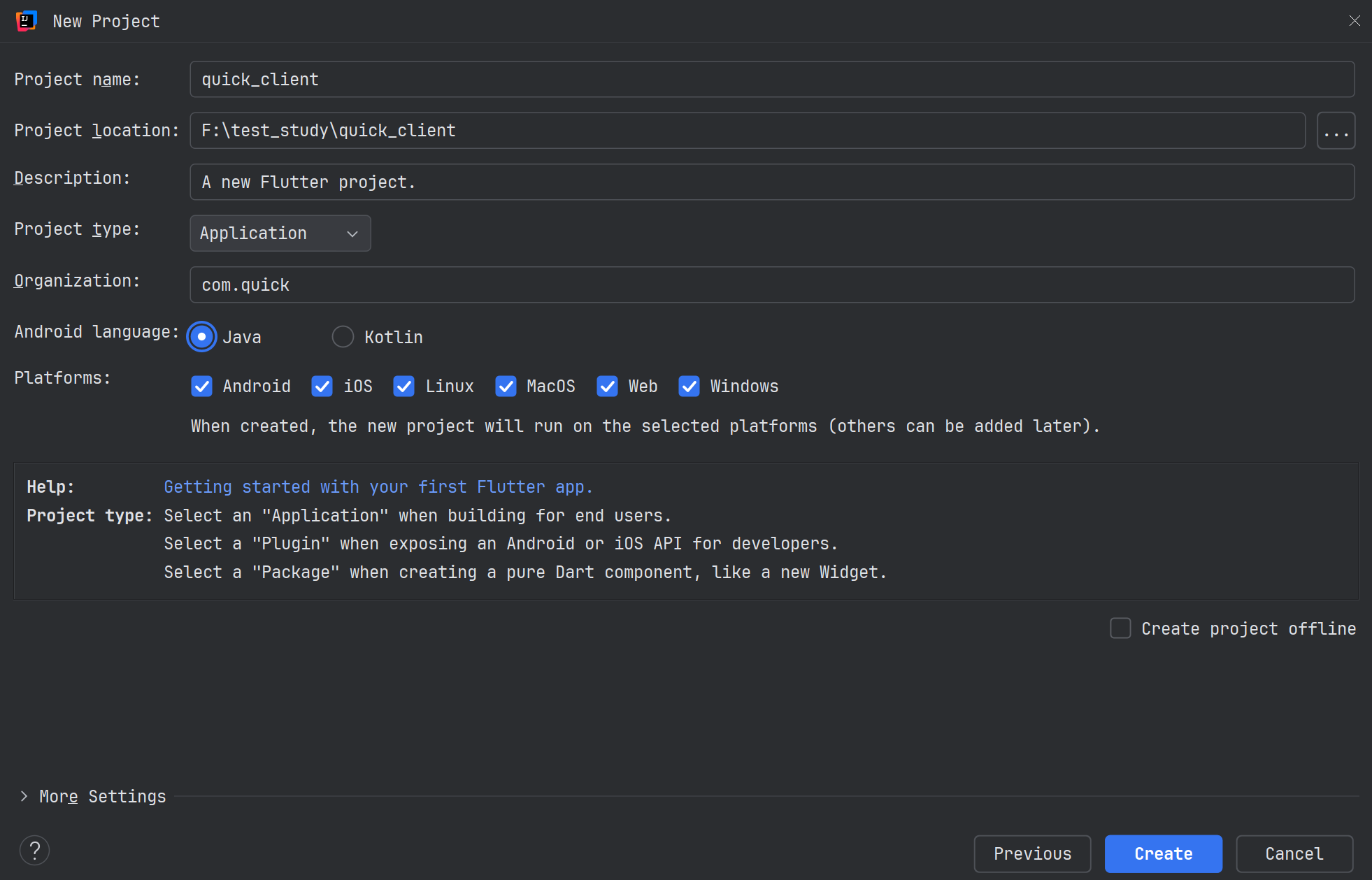
- 【不要有中文路径】注意图中 project name 和 project location
Flutter
知识大纲
构建
- 打包构建 exe apk ipa
- pubspec.yaml 包管理
- 多环境
开发
路由 go_router
状态存储 Riverpod
UI:TDesign、Material(安卓风格)、Cupertino(iOS风格)
接口请求 http、dio
静态资源
- logo
优化
- i18n
- 主题
- 工具类
- mock
快速入门
import 'package:flutter/material.dart';

void main() {
  runApp(const MyApp());		//运行 MyApp()
}


class MyApp extends StatelessWidget {		// 定义一个名为 MyApp 的 Widget
  const MyApp({super.key});

  // 这个 Widget 是应用程序的根(root)部件
  @override
  Widget build(BuildContext context) {
    return MaterialApp(
      title: 'Quick App',
      home: Text("Hello World 闻7"),
      debugShowCheckedModeBanner: false,	//这个不加在右上角会有 debug 的调试横幅
    );
  }
}widget是 flutter 中的基本构成要素,动画、组件、布局、等等一切都是widget,所有总是会听到「万物皆 Widget (everything is a widget)」的说法。class MyApp extends StatelessWidget
import 'package:flutter/material.dart';
import 'package:flutter/widgets.dart';

class HomePage extends StatelessWidget {
  @override
  Widget build(BuildContext context) {
    return Scaffold(

      appBar: AppBar(title: Text("我是 AppBar")),
      drawer: Drawer(child: Text("我是侧边栏")),
      body: Text("我是首页"),

      floatingActionButton: FloatingActionButton(
        onPressed: () {
          print("点击了浮动按钮");
        },
        child: Text("点击"),
      ),

      bottomNavigationBar: BottomNavigationBar(
        type: BottomNavigationBarType.fixed,		//如果下面 items 有超过3个,添加这个固定
        items: <BottomNavigationBarItem>[
          BottomNavigationBarItem(icon: Icon(Icons.home), label: "首页"),
          BottomNavigationBarItem(icon: Icon(Icons.shopping_cart), label: "商城"),
          BottomNavigationBarItem(icon: Icon(Icons.message), label: "消息"),
          BottomNavigationBarItem(icon: Icon(Icons.person), label: "我的"),
        ],
      ),
      //其他更多
    );
  }
}- 新建一个 HomePage 的 widget,并且返回
Scaffold,替换 Scaffold (脚手架)是用来构建页面的骨架,里面有一些appBar (顶部导航栏),body (主体内容),floatingActionButton (悬浮按钮)等等
目录
quick_flutter
├── .dart_tool
│
├── android
├── assets
│	├── fonts
│		├── NotoSansSC-Bold.ttf
│		├── NotoSansSC-Medium.ttf
│		└── NotoSansSC-Regular.ttf
├── ios
│
├── lib					【代码】
│   ├── common
│   ├── i18n
│   ├── pages
│   ├── routers
│   ├── stores
│   ├── widgets
│   └── main.dart
|
├── linux
├── macos
├── web
├── windows
|
├── analysis_options.yaml
└── pubspec.yaml 【依赖】常见 Widget
基础组件
- dart
import 'package:flutter/material.dart'; import 'package:flutter/widgets.dart'; class HomePage extends StatelessWidget { @override Widget build(BuildContext context) { return Scaffold( body: Column( children: [ Text("我是闻家奇"), //缩放 Text("文本缩放", textScaler: TextScaler.linear(2.5)), //屏幕阅读器无障碍设计,安卓启用 TalkBack Text("¥100", semanticsLabel: "人民币100元"), //误区:文本进行居右,但是没有生效,理论:Text是占据边界右侧,但是没有容器,容器就是本身 Text("我是闻家奇", textAlign: TextAlign.right), //当设置了容器,宽度,自动撑开父容器,导致上面的居中 Container( width: 200, color: Colors.teal, child: Text("我是闻家奇", textAlign: TextAlign.right), ), //根据屏幕大小,仅有1行,溢出变成 ... Text("配置最大行数" * 5, maxLines: 2), Text("溢出变成点点点" * 5, maxLines: 1, overflow: TextOverflow.ellipsis), ], ), ); } } - dart
import 'package:flutter/material.dart';
import 'package:flutter/widgets.dart';

class HomePage extends StatelessWidget {
  @override
  Widget build(BuildContext context) {
    return Scaffold(
      body: Column(
        children: [
          ElevatedButton(onPressed: () => {}, child: Text("我是凸起按钮")),
          TextButton(onPressed: () => {}, child: Text("我是文本按钮")),
          OutlinedButton(onPressed: () => {}, child: Text("我是描边按钮")),

          IconButton(onPressed: () => {}, icon: Icon(Icons.send)),
          FloatingActionButton(onPressed: () => {}, child: Icon(Icons.add)),

          ElevatedButton(onPressed:  () => {}, child: Icon(Icons.send)),
          ElevatedButton.icon(onPressed: () => {}, icon: Icon(Icons.send), label: Text("发送"),),
        ],
      ),
    );
  }
}
页面结构
- Scaffold:一个页面的基础结构,包含
AppBar、body、FloatingActionButton等。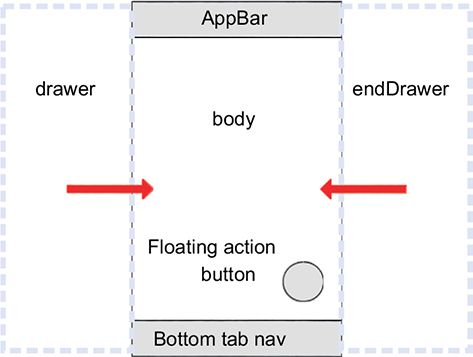
AppBar:顶部导航栏。搜索框,回到首页,返回箭头等等
Drawer:侧边抽屉。
BottomNavigationBar:底部导航。
TabBar / TabBarView:标签页切换。
- Scaffold:一个页面的基础结构,包含
布局
- Row / Column:水平 / 垂直排列子 Widget。
- Stack:叠放(类似层叠布局,可实现悬浮按钮)。
- Expanded / Flexible:在
Row/Column里按比例分配空间。 - Center / Align:居中 / 对齐。
- Padding / SizedBox:加内边距 / 固定宽高。
- Container:万能盒子,可包裹样式、对齐、边距。
- ListView / GridView:可滚动的列表 / 网格。
- Wrap:自动换行的布局(比如标签、按钮组)。
表单输入
滚动
功能
样式
布局
PC端
自定义顶部栏
引入组件
# pubspec.yaml 里引入 bitsdojo_window: ^0.1.6
dependencies:
bitsdojo_window: ^0.1.6去掉自带顶部栏,Flutter 只能画客户区(Client Area)Windows 标题栏属于非客户区(Non-Client Area)
在 windows/runner/main.cpp 文件里添加
文件开头添加
- c++
#include <bitsdojo_window_windows/bitsdojo_window_plugin.h>
在
wWinMain函数开头添加- c++
// 去掉系统标题栏(frameless)
bitsdojo_window_configure(BDW_CUSTOM_FRAME | BDW_HIDE_ON_STARTUP);
#include <flutter/dart_project.h>
#include <flutter/flutter_view_controller.h>
#include <windows.h>

#include <bitsdojo_window_windows/bitsdojo_window_plugin.h>  // ✅ 加这个

int APIENTRY wWinMain(HINSTANCE instance, HINSTANCE prev, wchar_t* command_line, int show_command) {
  // 去掉系统标题栏(frameless)
  bitsdojo_window_configure(BDW_CUSTOM_FRAME | BDW_HIDE_ON_STARTUP); // ✅ 加这个

  // ... 原来的 Flutter 窗口创建逻辑保持不动 ...
  // 创建完之后,Dart 里 appWindow.show() 才显示
}结束之后执行,只 Hot Reload/Restart 可能看不到效果
flutter clean
flutter pub get
flutter run -d windowsimport 'package:bitsdojo_window/bitsdojo_window.dart';
import 'package:flutter/cupertino.dart';
import 'package:flutter/material.dart';
/// window 自定义顶部栏
class CustomTitleBar extends StatelessWidget {
@override
Widget build(BuildContext context) {
return SizedBox(
height: 58, //36接近macOS 40常见桌面工具 44接近Win11
child: WindowTitleBarBox(
child: Container(
color: Colors.white,
child: Row(
children: [
// 左侧:可拖拽空白区(一定要用 MoveWindow)
Expanded(
child: MoveWindow(
child: Container(), // 留白即可
),
),
CircleAvatar(),
SizedBox(width: 8),
const WindowButtons(),
],
),
),
),
);
}
}
class WindowButtons extends StatelessWidget {
const WindowButtons({super.key});
@override
Widget build(BuildContext context) {
final buttonColors = WindowButtonColors(
iconNormal: Colors.black54,
mouseOver: Colors.black12,
mouseDown: Colors.black26,
iconMouseOver: Colors.black,
iconMouseDown: Colors.black,
);
return Row(
children: [
MinimizeWindowButton(colors: buttonColors),
MaximizeWindowButton(colors: buttonColors),
CloseWindowButton(
colors: WindowButtonColors(
iconNormal: Colors.black54,
mouseOver: Colors.redAccent,
mouseDown: Colors.red,
iconMouseOver: Colors.white,
iconMouseDown: Colors.white,
),
),
],
);
}
}菜单栏
import 'package:flutter/cupertino.dart';
import 'package:flutter/material.dart';

/// windows 常见菜单:文件、编辑、主题、帮助
/// 文件: 新建|打开|关闭
/// 设置: 语言|主题|通知
/// 帮助: 官网|更新|许可
class MenuBarWidget extends StatelessWidget {
  const MenuBarWidget({super.key});

  @override
  Widget build(BuildContext context) {
    return Row(children: [Expanded(child: MenuBar(
      children: [
        SubmenuButton( menuChildren: [
          MenuItemButton(child: Text('新建'),onPressed: ()=>{debugPrint('点击了新建')},),
          MenuItemButton(child: Text('打开'),onPressed: ()=>{debugPrint('点击了打开')},),
          MenuItemButton(child: Text('关闭'),onPressed: ()=>{debugPrint('点击了关闭')},)
        ],child: Text('文件')),
        SubmenuButton(menuChildren: [
          MenuItemButton(child: Text('语言'),onPressed: ()=>{debugPrint('点击了语言')},),
          MenuItemButton(child: Text('主题'),onPressed: ()=>{debugPrint('点击了主题')},),
          MenuItemButton(child: Text('通知'),onPressed: ()=>{debugPrint('点击了通知')},)
        ],child: Text('设置')),
        SubmenuButton( menuChildren: [
          MenuItemButton(child: Text('官网'),onPressed: ()=>{debugPrint('点击了官网')},),
          MenuItemButton(child: Text('更新'),onPressed: ()=>{debugPrint('点击了更新')},),
          MenuItemButton(child: Text('许可'),onPressed: ()=>{debugPrint('点击了许可')},)
        ],child: Text('帮助')),
      ],
    ))]);
  }
}移动端
安全区域 SafeArea
安全区域指的是 屏幕中不会被系统 UI 遮挡的区域,主要包括:
- 刘海 / 水滴屏
- 状态栏(电量、时间)
- 底部手势条(Home Indicator)
- 全面屏圆角裁切
如果你不处理安全区域,常见问题是:
- 内容被刘海盖住
- 底部按钮被 Home 手势条挡住
- 全屏页面体验很糟
SafeArea(
  top: true,
  bottom: true,
  left: false,
  right: false,
  child: Text('自定义区域')
)网络 dio
flutter pub add dio封装 dio
api
使用
final resp = await babySelectPage(page: 1, rows: 10);状态存储 flutter_riverpod
flutter pub add flutter_riverpod # 状态存储void main() {
// runApp(const MyApp());
runApp(
const ProviderScope(
child: MyApp(),
),
);
}入门
// 随便新建一个文件 providers.dart
import 'package:flutter_riverpod/legacy.dart';

final nameProvider = StateProvider<String>((ref) => "wen");

final ageProvider = StateProvider<int>((ref) => 1);import 'package:baby_edu/stores/providers.dart';
import 'package:flutter/material.dart';
import 'package:flutter_riverpod/flutter_riverpod.dart';
class BabyPage extends ConsumerWidget {
const BabyPage({super.key});
@override
Widget build(BuildContext context, WidgetRef ref) {
final name = ref.watch(nameProvider); //通过 ref.watch 监听 nameProvider 的值
final age = ref.watch(ageProvider);
return Scaffold(
body: Column(
children: [
Text("姓名:$name"),
Text("年龄:$age 岁"),
FloatingActionButton(
onPressed: () {
// 通过 ref.read 读取变量,通过 state 设值
ref.read(nameProvider.notifier).state = "闻家奇";
ref.read(ageProvider.notifier).state++;
},
child: Text("点我"),
),
],
),
);
}
}持久化存储
路由
UI (tdesign_flutter)
flutter pub add tdesign_flutter日志
常用插件
相机 camera
本地存储 SQLite
# 移动端
flutter pub add sqflite
# PC端
flutter pub add sqflite_common_ffi图表 fl_chart
flutter pub add fl_chart打包
应用名称修改(最好不要使用中文)
Windows
项目根目录/windows/CMakeLists.txt 修改 set(BINARY_NAME "改成应用名称")
Android
项目根目录/android/app/src/main/AndroidManifest.xml 修改 android:label="改成应用名称"
iOS
应用 Logo 修改
统一修改
flutter pub add flutter_launcher_icons在根目录下创建 assets 目录,结构如下
quick_flutter
├── assets				【图标 1024x1024 PNG】
│   └── icon
│   	└── app.png
|
├── lib
└── pubspec.yaml 【依赖】# 在 pubspec.yaml 添加
dev_dependencies:
flutter_launcher_icons: ^0.14.4
flutter_launcher_icons:
image_path: "assets/icon/app.png" # 你的图标
android: true
ios: true
windows:
generate: true
image_path: "assets/icon/app.png"
macos:
generate: true
image_path: "assets/icon/app.png"
web:
generate: true
image_path: "assets/icon/app.png"# 执行命令,自动生成所有平台图标
flutter pub get
flutter pub run flutter_launcher_iconsWindow
Android
iOS
Windows
前置
flutter config --enable-windows-desktopflutter doctor构建 exe
flutter clean
flutter pub get
flutter build windows --release产物路径:build/windows/x64/runner/Release/quick.exe
- 需要把整个 release 打包成 zip,如果只拿 quick.exe 可能报错缺失一些 dll 等。
安卓 Apk
前置
flutter doctor# pubspec.yaml 设置版本号
version: 1.0.0+1 # 1.0.0 是 versionName,+1 是 versionCode签名
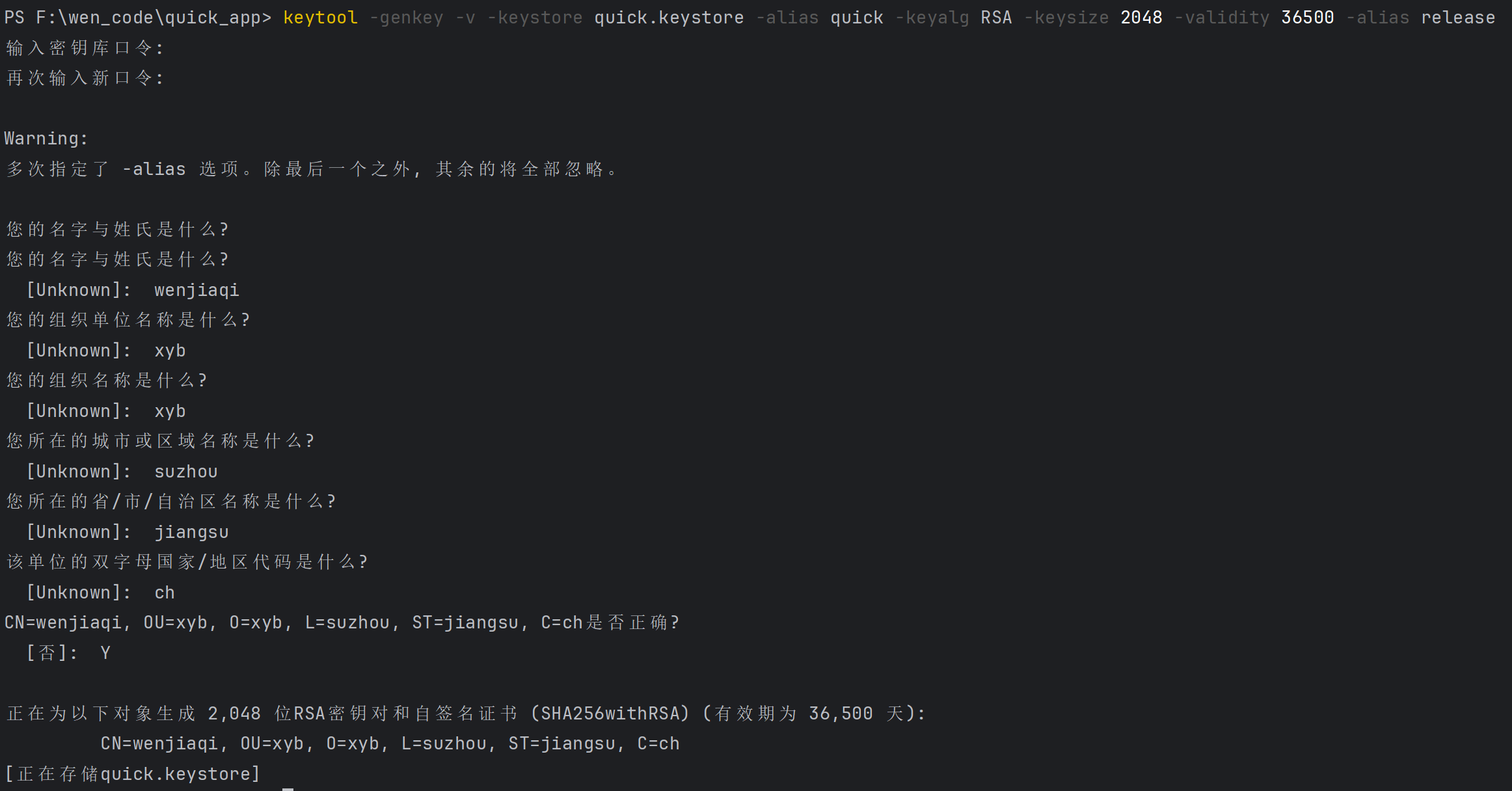
keytool -genkey -v -keystore xxx(项目名).keystore -keyalg RSA -keysize 2048 -validity 36500 -alias release
-storepass (storePassword密码) -keypass (keyPassword密码)keytool:JDK 自带的密钥与证书管理工具。-genkey:生成一对密钥(私钥/公钥)并创建自签名证书,保存到密钥库中。新版也可写-genkeypair,含义相同。-v:verbose,过程与结果输出更详细(会显示指纹等信息)。-keyalg RSA:密钥算法选择 RSA(Android 常用)。-keysize 2048:密钥长度 2048 位(安全与兼容的常用值)。-validity 36500:证书有效期天数,这里是 36500 天≈100 年。Android 安装/升级比对证书是否同一把密钥签的,而不是是否过期;设长一点省事。-keystore xxx(项目名).keystore:要创建/写入的密钥库文件的路径与文件名。可以写 D:\keys\quick.keystore,也可以直接写 quick.keystore 生成在当前目录下
也可以写成 quick.jks,一般以 .p12 .pfx或者 .jks(Java KeyStore) 或者 .keystore 结尾
- 可以配合另外一个参数
-storetype PKCS12-storetype JKS,当然也可以不写该参数
- 可以配合另外一个参数
把该文件拷贝到 当前项目/android/app 目录下
【不要上传到公开仓库或发给不可信人员】【不要上传到公开仓库或发给不可信人员】【不要上传到公开仓库或发给不可信人员】
- bash
# 查看具体信息
keytool -list -v -keystore .\android\app\quick.keystore
在 当前项目/android 目录下新建 key.properties
- bash
storeFile=app\\quick.keystore		# 这里是刚才生成 xxx(项目名).keystore 的路径
storeType=  						# JKS or PKCS12
storePassword=WJQ.123456
keyAlias=release
keyPassword=WJQ.123456
构建
flutter clean
flutter pub get

# 生成单个通用 APK(体积较大)
flutter build apk --release

# 或:按 ABI 拆分,体积更小(推荐自行分发时)
flutter build apk --release --split-per-abi

# 或:Play 商店推荐 AAB
flutter build appbundle --release构建成功会有提示信息【√ Built build\app\outputs\flutter-apk\app-release.apk】

网络问题
项目根目录/android/app/src/main/AndroidManifest.xml 在配置文件里添加网络权限和HTTP:
<uses-permission android:name="android.permission.INTERNET" />申请网络权限android:usesCleartextTraffic="true"注意添加这个
      在此文件里添加

<manifest xmlns:android="http://schemas.android.com/apk/res/android">
    <!-- 网络权限(必须有) -->
    <uses-permission android:name="android.permission.INTERNET" />
    <uses-permission android:name="android.permission.ACCESS_NETWORK_STATE" />

    <application
        android:usesCleartextTraffic="true"
        android:label="教投儿童中心"
        android:name="${applicationName}"
android:icon="@mipmap/ic_launcher">IOS ipa
发布
课程
什么时候「按平台」?什么时候「按尺寸」?
✅ 用【平台判断】的场景
- Windows / macOS 专属功能
- 快捷键(Ctrl / Command)
- 文件系统、窗口、右键菜单
- 桌面特有交互
✅ 用【尺寸判断】的场景(90% UI)
- 底部 Tab vs 左侧菜单
- 单栏 / 双栏 / 三栏布局
- 列表 + 详情页
👉 UI = 尺寸优先,能力 = 平台优先
Flutter 中不存在“手机 / 平板 / PC”的绝对概念,
真正可靠的是:屏幕尺寸 + 平台能力。
自定义样式
dependencies:
bitsdojo_window: ^0.1.6void main() {
runApp(const MyApp());
// 窗口创建好之后再设置(避免拿不到句柄)
doWhenWindowReady(() {
final win = appWindow;
win.minSize = const Size(900, 600); //最小值
win.size = const Size(1200, 800); //默认值
win.alignment = Alignment.center; //居中
win.show();
});
}字体
Flutter 的字体选择是“先找指定 fontFamily → 找系统回退”
你没指定字体时,Material 默认会用一套字体策略:
- 英文常能命中比较正常的系统字体
- 中文会走 fallback 字体链
- Windows 上 fallback 有时候会命中一些“看起来不舒服”的字体(字形、hinting、字重都不同)
字体:免费字体
- https://fonts.google.com
- Google 官方出品、完全免费、可商用、官方维护,质量稳定
- Noto Sans SC(首选)Noto Sans Simplified Chinese
- Flutter / Web / PC 都非常友好,Windows / macOS 都好看
NotoSansSC-Thin        → 极细
NotoSansSC-ExtraLight → 很细
NotoSansSC-Light       → 偏细
NotoSansSC-Regular     → 正常正文 ⭐
NotoSansSC-Medium      → 稍粗(菜单/按钮 ⭐)
NotoSansSC-SemiBold    → 半粗(标题)
NotoSansSC-Bold        → 粗体(强调⭐)
NotoSansSC-ExtraBold  → 很粗
NotoSansSC-Black → 极粗assets/fonts/
├─ NotoSansSC-Regular.ttf (400)
├─ NotoSansSC-Medium.ttf (500)
└─ NotoSansSC-Bold.ttf (700)# pubspec.yaml 里修改字体
flutter:
fonts:
- family: NotoSansSC
fonts:
- asset: assets/fonts/NotoSansSC-Regular.ttf
weight: 400
- asset: assets/fonts/NotoSansSC-Medium.ttf
weight: 500
- asset: assets/fonts/NotoSansSC-Bold.ttf
weight: 700class MyApp extends StatelessWidget {
const MyApp({super.key});
@override
Widget build(BuildContext context) {
return MaterialApp(
title: 'Flutter Demo',
theme: ThemeData(
fontFamily: 'NotoSansSC' //设置字体
),
home: SystemShell(),
debugShowCheckedModeBanner: false,
);
}
}